
Backend Code Generation
The GoWind Toolkit backend code generator turns a database schema into a complete set of Go-Kratos microservice code in one click — Protobuf definitions, ORM models, the data access layer, the business logic layer, Wire dependency injection, and the full layered stack.
Overall Workflow
Backend code generation takes just 4 steps, and works the same for monoliths and microservice projects:
- Initialize the project: generate an enterprise-grade standard microservice architecture in one click
- Bind a database: connect directly or import SQL to quickly load your table structures
- Configure the tables: choose a packaging mode as needed and filter out unused tables
- Generate in one click: produce the full set of layered backend business code automatically
Step 1: Create a Backend Project
Entry Point
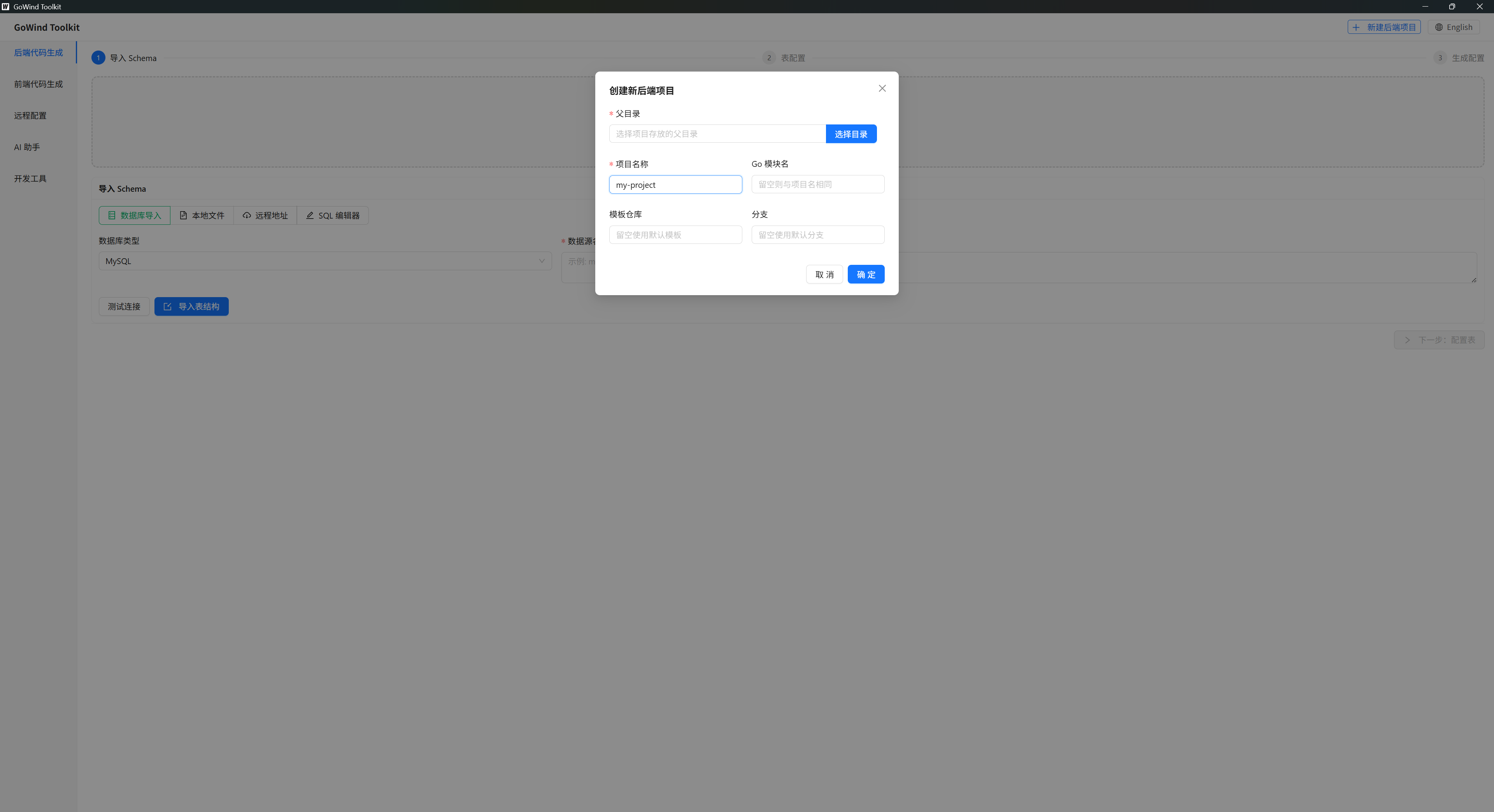
Open the GoWind Toolkit desktop client and click [Create Backend Project] in the top-right corner of the home page to open the creation dialog.
Configuration Options
| Option | Purpose | Recommendation |
|---|---|---|
| Parent directory | The folder on your computer where the project is stored | Use a pure-English path — no Chinese characters, spaces, or special symbols |
| Project name | The local project folder name | Kebab-case, e.g. go-wind-demo |
| Go module name | The dependency reference path in go.mod | For company projects, use the repository path; for personal projects, keep it the same as the project name |
| Template repository | A custom project initialization template | Leave empty by default to use the official template; teams can configure a private template |
| Branch | The branch of the template repository | Leave empty by default to pull the main branch automatically |
Creation Steps
- Pick an empty folder with a pure-English path
- Fill in the project name and the Go module name
- Keep the template repository and branch at their defaults
- Click confirm, and the tool automatically initializes the complete project architecture
Generated Project Directory
go-wind-demo/
├── api/          # Proto definitions, gRPC interfaces, request/response structs
├── cmd/          # Entry points for all services
├── internal/     # Core private business code
│   ├── data/     # Database data access layer
│   ├── server/   # Routing, middleware, service registration
│   └── service/  # Interface implementation layer
├── go.mod        # Dependency management file
└── go.sum        # Dependency checksum file
CLI alternative
You can also create a project from the CLI:
gow new myproject
cd myproject && go mod tidy
Step 2: Connect to a Database & Import Table Structures
Import Modes
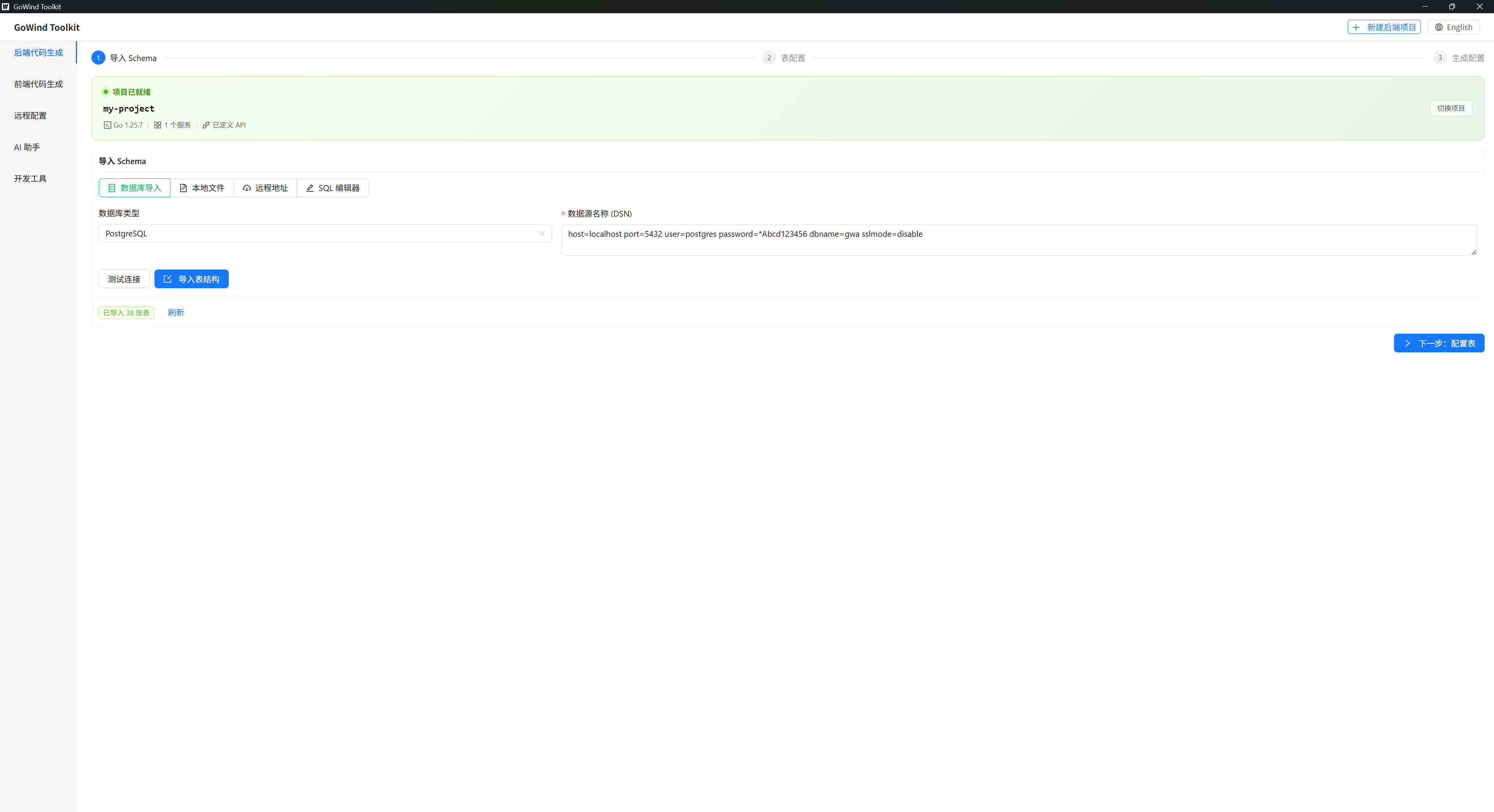
The tool supports three import methods:
| Mode | Description | Recommended For |
|---|---|---|
| Direct database connection | Connect straight to MySQL/PostgreSQL, etc. | Day-to-day development (recommended) |
| SQL file import | Import a .sql file | Offline environments |
| Manual SQL | Write DDL in the built-in editor | Quick experiments |
Database Connection
Switch to the [Database Import] tab and enter your database connection info:
user:password@tcp(127.0.0.1:3306)/db_name?charset=utf8mb4&parseTime=True&loc=Local
Supported databases:
- MySQL (recommended)
- PostgreSQL
- SQLite
- Oracle
Import Steps
- After entering the connection info, click [Test Connection] to confirm the database is reachable
- Once connected, click [Import Table Structures]
- The tool automatically loads every table in the database and displays them visually
CLI alternative
# Interactive
gow generate

# Full command line
gow generate --dsn "mysql://user:pass@tcp(localhost:3306)/dbname" --service user
Step 3: Table Packaging Configuration
Three Packaging Modes
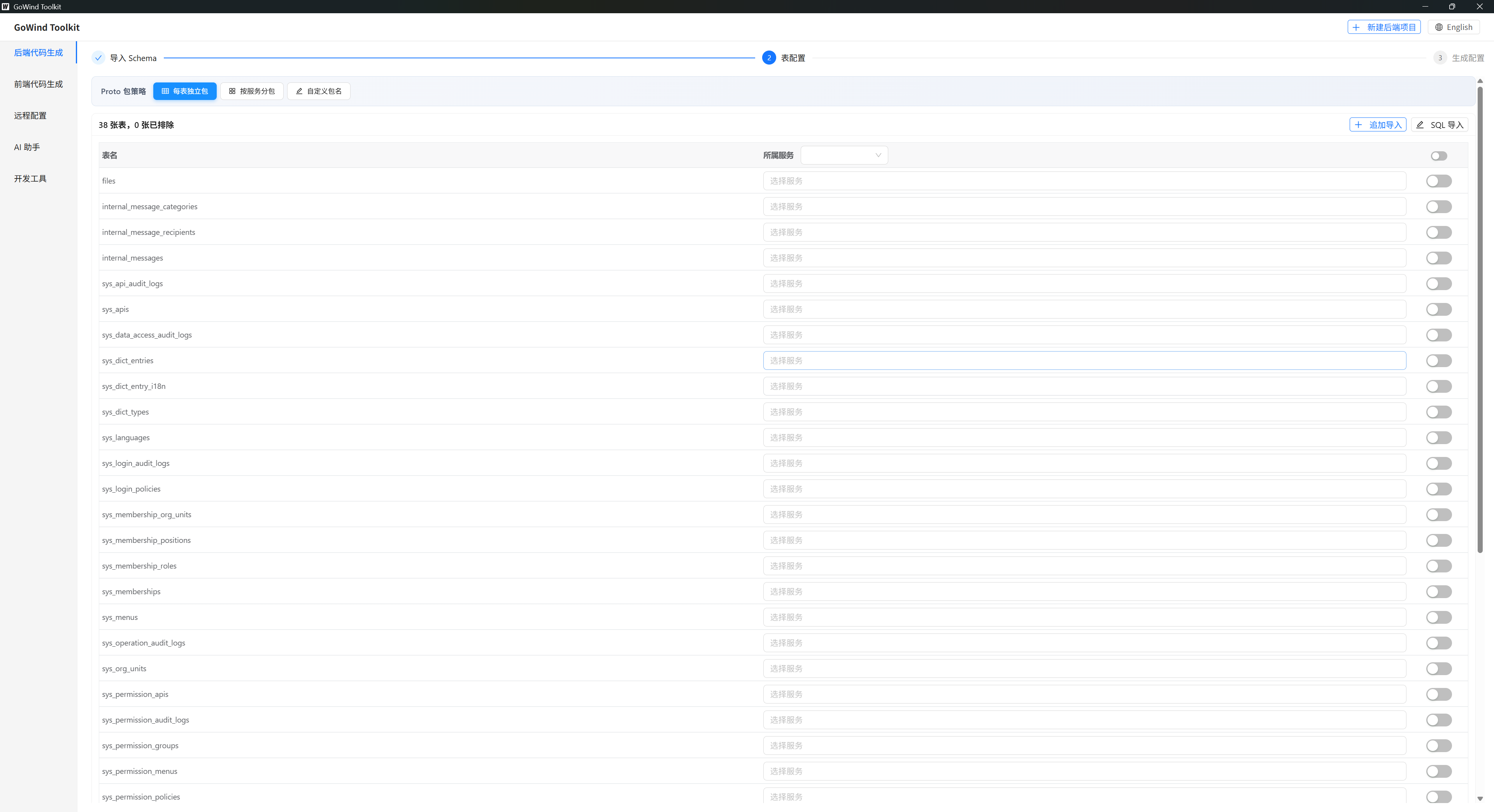
| Mode | Description | Recommended For |
|---|---|---|
| One package per table | Each table gets its own Proto package | Small monoliths, personal projects |
| Package per service | Split services by business domain, strongly decoupled | Enterprise microservices (recommended) |
| Custom package names | Specify package paths freely | Integrating with existing projects |
Fine-Grained Configuration
- Assign each data table to the corresponding business service
- Untick log tables, junction tables, and temporary tables to avoid generating redundant code
- Individually edit table model names, package names, and comments
Step 4: Generate Code in One Click
Generation Parameters
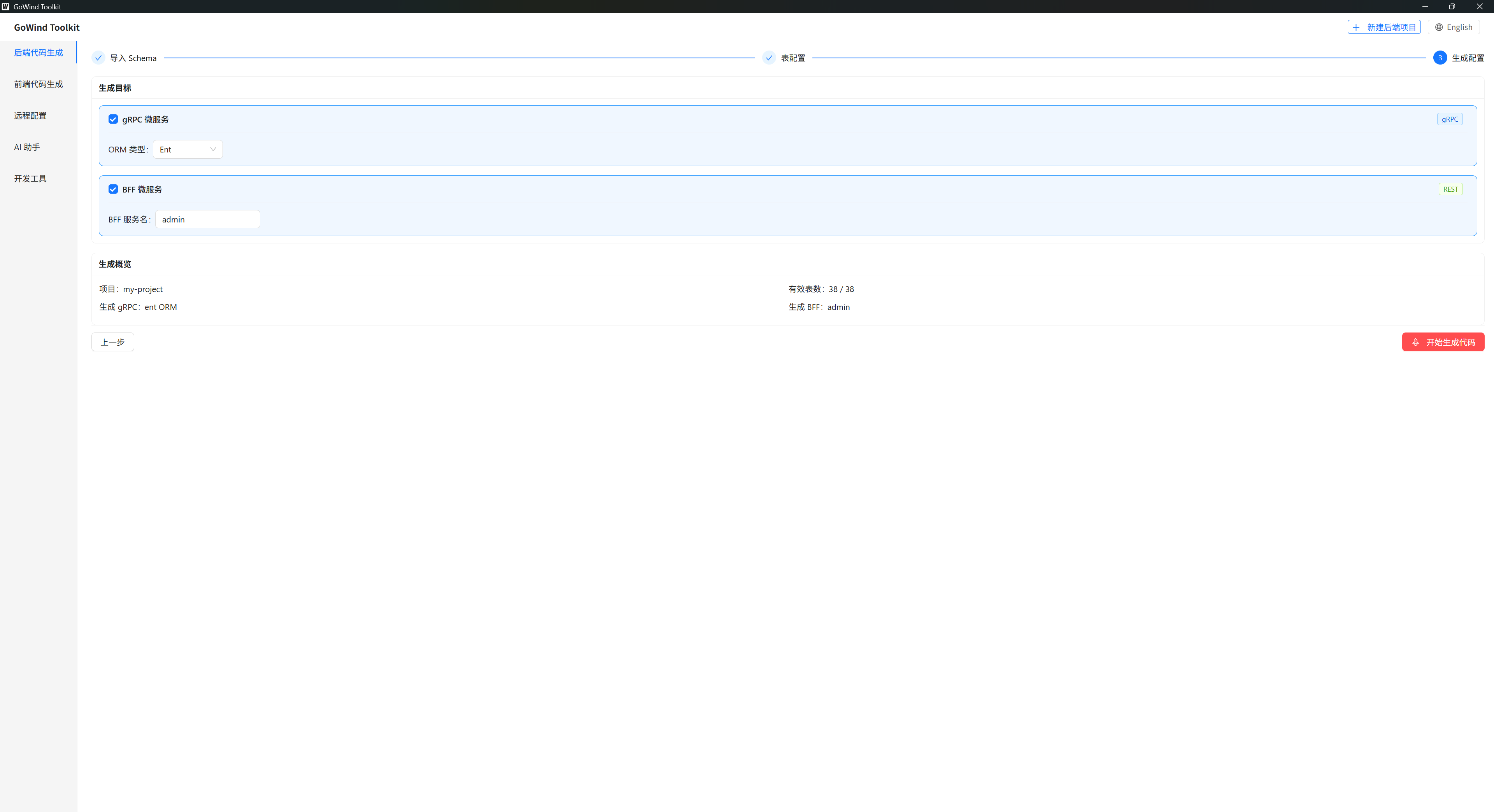
| Parameter | Description |
|---|---|
| Service types | Tick both gRPC + BFF to cover internal RPC and external HTTP |
| ORM framework | Ent (recommended, type-safe) or GORM |
| BFF service name | A custom gateway service name, e.g. admin, user, order |
| Generation preview | Review the tables and service counts to confirm the generation scope |
What Gets Generated
Click [Generate Code] and the tool automatically produces the full set of code in one go:
- Proto definitions: gRPC request/response structs
- ORM models: Ent entity models and database mapping structures
- Data layer: DAO database access code
- Biz layer: complete CRUD business code
- Service layer: interface implementations, routing, and service registration code
- Wire: dependency injection code
Project Verification
After generation completes, run this in the project root:
go mod tidy
If it runs without errors, the project is ready to use.
One-shot CLI commands
# Generate for a specific ORM and set of tables
gow generate --dsn "mysql://..." \
  --service user --orm ent --servers grpc --tables users,roles

# Generate proto files only
gow generate --dsn "postgres://..." --service admin --proto-only

# Generate a REST service (proxied from a gRPC service)
gow generate --dsn "mysql://..." --service user-admin \
  --servers rest --source-module user --skip-orm
CLI Command Cheat Sheet
| Command | Description |
|---|---|
gow new <name> | Create a new project |
gow add service <name> -s grpc | Add a gRPC service |
gow add service <name> -s rest | Add a REST service |
gow add service <name> -s rest -s grpc | Support both at once |
gow generate | Interactive code generation |
gow ent [service] | Generate Ent code |
gow wire [service] | Generate Wire code |
gow api | Generate Proto & API |
gow run [service] | Run a service |
gow extract <src> <dst> -o <entities> | Extract modules into another service |
gow version | Show the version |
Microservice Evolution (Module Extraction)
As your business grows, use gow extract to pull modules out of one service into a new one:
# Extract the role module from the admin service into the user service
gow extract admin user -o role

# Extract multiple entities
gow extract admin user -o role,permission

# Specify the ORM type manually
gow extract admin user -o role --orm gorm

# Keep the source files (deleted by default)
gow extract admin user -o role --keep-source
The target service is created automatically if it doesn't exist, and the ORM type is auto-detected.
Troubleshooting
| Problem | Solution |
|---|---|
| Initialization fails | The project path must not contain Chinese characters, spaces, or special symbols |
| Database connection fails | Check the port, credentials, and the database's remote-access permissions |
| Dependency errors | Always run go mod tidy after generation |
| Too much redundant code | Filter out log tables, junction tables, and other unused tables at the configuration stage |
Related documents: