
GoWind Edu Product Introduction
GoWind Edu is an AI education platform streamlined and rebuilt on the GoWind Content Hub base, providing an AI question bank, online practice, a wrong-question notebook, AI answer analysis, AI assessment, and other core capabilities. The platform is designed around the learning loop of "practice — grading — wrong questions — review — homework — learning analytics", accompanied throughout by an AI tutor, helping schools and training institutions run daily teaching and assessment with a lower teacher workload and higher practice efficiency.
GoWind Edu is a closed-source commercial product, delivered and deployed for schools and institutions on-premise: the system runs in the customer's own server environment, so teaching data stays with the customer.
Product UI
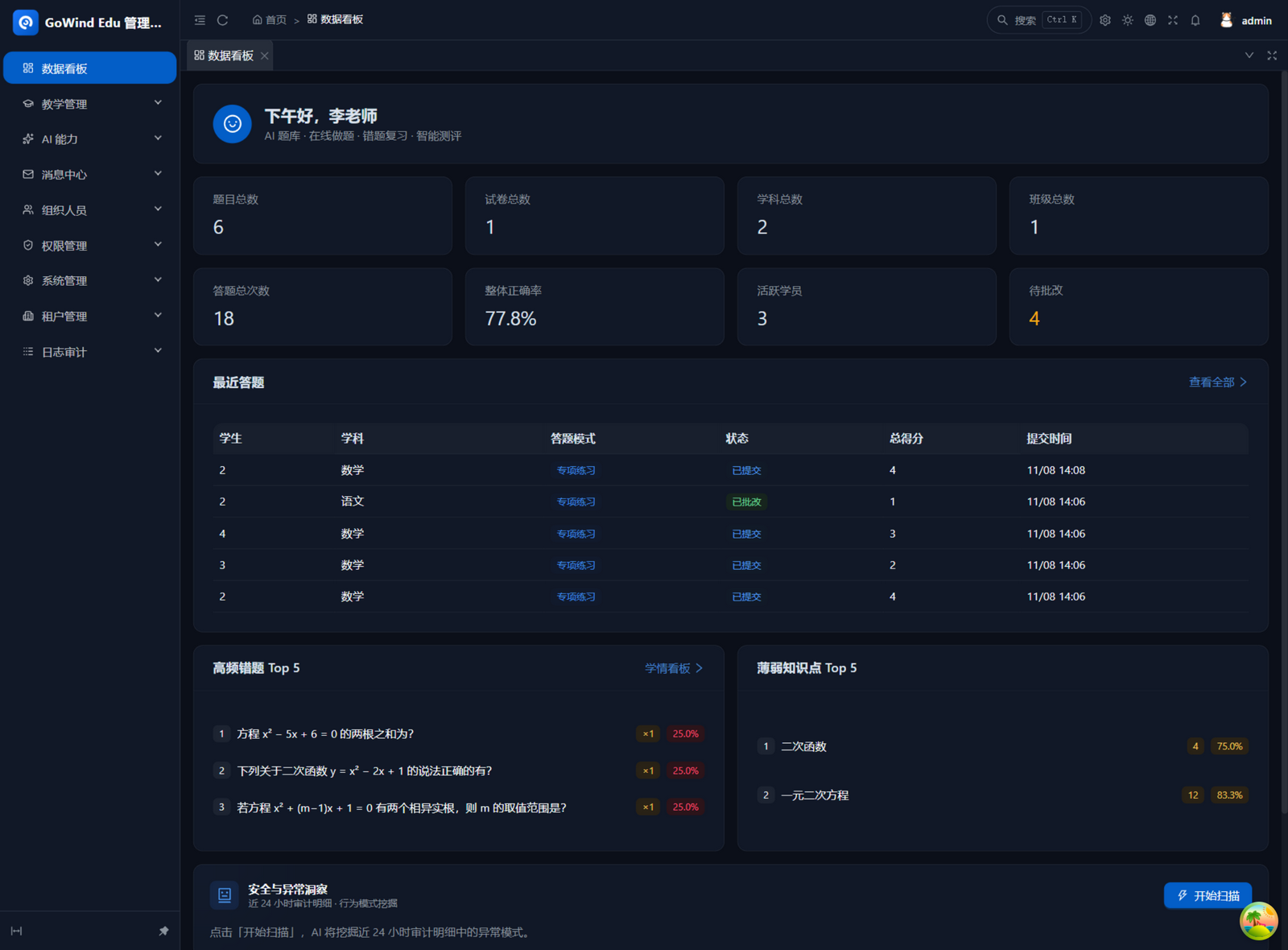
The admin "Data Dashboard" gives a one-screen view of teaching: question bank, papers, subjects, and class sizes at a glance; answer volume, overall accuracy, active students, and pending grading aggregated in real time; top wrong questions and weak knowledge points surfaced automatically as direct leads for teaching research.
1. Positioning: A Learning Loop with an AI Tutor
Many online practice tools only solve one step, "doing problems": the student finishes, the system scores, and that's the end. GoWind Edu catches every step that follows a practice session:
| Step | What the platform does | Role of the AI tutor |
|---|---|---|
| Practice | Smart practice selects problems automatically by weak knowledge points; focused practice is customized by subject / knowledge point / volume / question type | Recommends what to practice today |
| Grading | Objective questions are scored instantly; subjective questions are graded asynchronously by AI | Provides scores and comments |
| Wrong questions | Incorrect answers are collected automatically into the wrong-question notebook, with error-cause tagging | Explains wrong answers, recommends similar problems, generates variant drills |
| Review | A review plan is generated automatically by the forgetting curve | Adaptively adjusts each student's review intervals |
| Homework | Teachers assign homework; students view pending / submitted items and deadlines; the system auto-reminds students who haven't submitted 24 hours before the deadline | — |
| Learning analytics | Subject mastery, accuracy trends, class leaderboards, class reports | Produces whole-paper reviews and practice suggestions |
Every day, students open "Today's Tasks" and know what to review, which homework to submit, and which weak point to fix; the AI tutor steps in at any moment during Q&A, grading, and explanations, like a private tutor who is always online. Teachers don't need to chase or tabulate: completion rates, wrong questions, and weak points are aggregated automatically into the teacher dashboard.
How It Differs from Ordinary Drill Tools
| Aspect | Ordinary drill tools | GoWind Edu |
|---|---|---|
| After finishing | Only a score, nothing more | Wrong questions collected automatically; review scheduled automatically |
| Subjective questions | Usually self-graded or skipped | AI grading provides scores and comments, with the teacher making the final call |
| Review scheduling | Relies on student discipline or parent reminders | Ebbinghaus + SM-2 (spaced repetition) scheduling, with in-site and WeChat reminders when due |
| Variant drills | None | AI-generated variants of wrong questions, kept private per student |
| Teacher side | Missing | Grading Center, learning analytics dashboard, AI class reports, printable wrong-question sheets |
| Deployment | Public cloud SaaS | On-premise deployment for schools / institutions |
2. Core Highlights
1. AI Grading and AI Question Generation
- AI grading of subjective questions: after submission, subjective questions are graded asynchronously by AI with scores and comments; students can self-assess against the comments. In the Grading Center, teachers accept AI scores in bulk with one click for final grading, or override scores manually — statistics recalculate automatically after any change. Subjective answers can be typed or photographed (up to 3 photos); AI grades against the image content with paragraph-level annotations, and can polish a teacher's comment drafts into something more professional and specific.
- AI question generation + semantic deduplication: pick knowledge points and let AI generate questions; the system deduplicates via semantic vectors to avoid repeating existing questions. Suspect questions (e.g., with abnormal error rates) raise alerts for teacher review.
- OCR photo-based question import: photograph paper exams and the questions are recognized into the question bank; combined with AI illustration, digitizing existing question inventories is quick.
2. SM-2 Adaptive Review
Wrong questions automatically generate a review plan based on the Ebbinghaus forgetting curve, with intervals adapted by the SM-2 (spaced repetition) algorithm: correct answers lengthen the interval, wrong answers shorten it — the review rhythm of every question is personalized for every student. Tasks due are pushed via in-site messages and WeChat, and the student side provides a 7-day review calendar with completion statistics.
3. Wrong-Question Notebook Loop
Automatic collection, accumulating repeated mistakes, error-cause tagging, similar-problem recommendations, AI variant drills (variants kept private per student), printable wrong-question sheets, and removal once mastered — wrong questions move from "being recorded" to "being eliminated".
4. Learning Analytics Dashboard
- Student side: cumulative answers, accuracy, consecutive study-day streak, subject mastery, 30-day trends, and the class answer leaderboard.
- Teacher side: accuracy overview, high-frequency wrong-question ranking, weak knowledge-point ranking, trend charts, error-cause distribution, suspect-question alerts, disengagement warnings, multi-class knowledge-point comparison, mastery matrix, review-execution board, plus AI-generated class learning reports and per-student analytics export.
5. Anti-Cheating and Exam Controls
- Questions and options are shuffled; page-switch counts are tallied and visible to teachers, with alerts on anomalies;
- Paper exams support attempt limits, time limits, and time windows, with leaderboards toggleable;
- In exam mode, answers submit automatically when the countdown ends — no manual collection needed.
6. Growth Center and Learning Paths
The learning path orders knowledge points to conquer by weakness, each step paired with an AI knowledge-point explainer card and targeted practice; mastery decays automatically when a topic goes unpracticed for a long time, so recommendations always reflect the current state. The Growth Center generates an AI weekly learning report every Monday (highlights, gaps, suggestions for the coming week), 12 achievement badges track learning milestones, and AI can even compose a custom practice set on the spot from a student's weak points — generate and go.
7. In-Class Quick Tests and Multi-Channel Reminders
Teachers launch an in-class quick test by picking knowledge points: the system assembles the paper instantly and delivers it to the class, answering progress streams to the screen live, and a score report (score distribution / rankings / per-question accuracy) is one click away for in-class review. Four event types — reviews due, homework chasing, grading done, and weekly reports — reach students via in-site messages, WeChat subscription messages, and email; schools enable channels in the admin console, and students choose their own notification preferences.
3. Three Clients at a Glance
| Client | Form | Main users | Core capabilities |
|---|---|---|---|
| Student | WeChat Mini Program / H5 | Students | Today's Tasks, smart / focused practice, five answering modes, proctored exams, wrong-question notebook, review plan, post-exam review, learning analytics report, Growth Center, learning paths, photo-captured wrong questions, in-class quick tests, AI tutor, homework, favorites and notes |
| Teacher | Web admin console | Teachers | Subject and knowledge-point management, class join codes, question bank building, paper assembly and publishing controls, in-class quick tests, homework and submission chasing, tiered homework, Grading Center, disengagement-warning dashboard, learning analytics, analytics export, printable wrong-question sheets |
| Admin | Web admin console | School / institution administrators | Data dashboard, organization and people, roles and permissions, dictionaries / multilingual / files / tasks, WeChat and email notification settings, audit logs, AI infrastructure |
Data flows in real time across the three clients: every paper and homework a teacher publishes, every answer and wrong question a student produces, feeds immediately into the Grading Center and the learning analytics dashboard, closing the loop of "teach — practice — assess — remediate".
Parents also get a lightweight read-only entry: a student generates a 10-minute invitation code in the student client, and once a parent binds with it, they can view their child's learning overview, weekly reports, and homework completion at any time — weekly reports are pushed to parents automatically when generated.
4. A Complete Teaching and Learning Journey
Taking a unit test as an example, here is how the three clients work together:
| Step | Who | What happens |
|---|---|---|
| 1. Build questions | Teacher | Build the question bank via Excel import / AI generation / OCR photo import; AI semantic deduplication ensures question quality |
| 2. Assemble the paper | Teacher | AI paper assembly draws questions automatically by knowledge point and difficulty, or generates a re-practice paper from high-frequency wrong questions in one click |
| 3. Publish | Teacher | Set the time window, attempt limit, time limit, and leaderboard toggle, then issue the paper to the class |
| 4. Answer | Student | Students open the paper from Today's Tasks / homework; questions and options are shuffled, page switches are counted, and answers submit automatically when time is up |
| 5. Grade | Teacher + AI | Objective questions are scored instantly; subjective questions get AI grading with comments, and the teacher accepts in bulk or overrides manually |
| 6. Review | Student + AI | Students read the AI whole-paper commentary and lost-points breakdown, then generate a practice paper in one click for targeted remediation |
| 7. Review plan | System + student | Wrong questions enter the Ebbinghaus review plan automatically, with SM-2 (spaced repetition) scheduling the next due review |
| 8. Retrospective | Teacher | The learning analytics dashboard shows high-frequency wrong questions, weak knowledge points, and the AI class report, informing the next teaching round |
5. AI Capability List
| AI capability | Description |
|---|---|
| Subjective-question grading | Automatic scoring of subjective questions with comments; teacher final review supported |
| Wrong-question explanations and follow-up Q&A | Explains wrong questions; students can keep asking follow-ups |
| AI question generation | Generates questions by knowledge point, deduplicated via semantic vectors |
| Wrong-question variants | Generates variant drills from wrong questions, kept private between students |
| Post-exam whole-paper commentary | Whole-paper review, lost-points breakdown, and practice suggestions |
| AI paper assembly | Draws questions automatically by knowledge point and difficulty to assemble papers |
| Similar-problem recommendations | Recommends same-type problems based on semantic similarity |
| AI conversational tutoring | Personalized Q&A grounded in the wrong-question notebook, with a guided mode |
| OCR problem recognition | Photographs problems and enters the recognized text into the question bank |
| Error-cause inference | When objective questions are answered wrong, AI infers the cause and pre-fills it; student-entered tags always take priority |
| AI comment polishing | Rewrites a teacher's comment drafts to be more professional and specific |
| Correction suggestions | When students report a problem, AI analyzes the issue and drafts a fix for the teacher's reference |
| Knowledge-point explainer cards and study handouts | Generates core concepts, worked examples, and common pitfalls from the textbook knowledge base — shared by teachers and students, printable |
| AI conversational practice questions | Composes practice sets on the spot from a student's weak points; questions stay private to each student |
| Student photo-captured wrong questions | Photograph off-campus paper problems; AI recognizes them into the personal wrong-question notebook and generates a review plan |
6. Applicable Scenarios
K12 Schools
Covers the full flow of daily homework, unit tests, and pre-exam review: teachers' grading burden drops significantly, review proceeds automatically along the forgetting curve, and the learning analytics dashboard supports teaching research and in-class reviews; class join codes let students join classes on their own, with no per-student data entry.
Training Institutions
Build question banks by subject and knowledge point and assemble tests quickly; class leaderboards, AI class reports, and printable wrong-question sheets are powerful tools for demonstrating teaching results — and weekly reports pushed straight to parents make progress visible every week, a direct lever for parent communication and renewals.
Corporate Training
Reuse the question bank, exam, and learning analytics capabilities to organize job certification, safety exams, and skill assessments; attempt limits, time limits, time windows, and anti-cheating controls keep assessments rigorous.
Scenario adaptation advice
Whatever the scenario, start by building out the complete knowledge-point tree: knowledge points are the shared foundation for smart practice selection, AI paper assembly, weak-point statistics, and review plans — the finer the granularity, the better the personalization.
7. On-Premise Deployment and Delivery
GoWind Edu is delivered as an on-premise deployment, supporting common methods such as Docker Compose and PM2, and runs on the school's or institution's own servers and intranet with no reliance on public cloud.
| Item | Description |
|---|---|
| Demo environment | No public demo site; features are as described in this document |
| Access entry | After deployment, the school / institution publishes the access URL |
| Admin account | The default administrator account is initialized at deployment |
| Teacher accounts | Created centrally by the administrator in the console |
| Student accounts | Students self-register and join classes with a class join code |
About trials and demos
GoWind Edu is a closed-source delivered product with no public demo site; to evaluate the product, use the contact channels below to request solution materials and arrange a deployment demo.
Technical form in one sentence: Go microservices back end + PostgreSQL (with built-in vector search) + Redis + MinIO object storage; the admin console is a React web app and the student client is a WeChat Mini Program / H5, with on-premise deployment via Docker Compose and PM2.
8. Related Documents and Contact
- Student Client Guide: the complete usage journey from registration to review and Q&A.
- Teacher and Admin Guide: the full workflow of question banks, paper assembly, homework, grading, learning analytics, and system administration.
For product inquiries, solution discussions, and deployment delivery, contact us on WeChat: yang_lin_bo, or email yanglinbo@gmail.com.