
GoWind MES (Manufacturing Execution System)
GoWind MES is a lightweight Manufacturing Execution System (MES) for small and mid-sized discrete manufacturers, covering the full production chain of "sales orders → work-order scheduling → shop-floor execution → batch traceability → quality management → equipment management". Every shop-floor action is captured as structured data, and the system integrates seamlessly with GoWind ERP and GoWind IoT: sales orders sync from ERP, equipment telemetry flows in from IoT, and work hours plus piece-rate wages flow back to finance in real time.
GoWind MES in three sentences:
- No implementation consultant needed — built on the unified GoWind family foundation: multi-tenancy, organization, roles & permissions, approval flows, in-app messaging, and audit logs all work out of the box
- The batch is the soul — material issues and outputs are bound to batch genealogy end to end; serial-number tracing answers "which material lot, which machine, and which operator built this unit" in one scan
- AI-ready — fully structured records of work reports, inspections, and telemetry; predictive maintenance is already shipped (trend extrapolation + ML model inference), with intelligent scheduling and SPC-assisted diagnosis deepening continuously
Version note
All six MES domains (planning & scheduling, execution, quality, equipment, master data, platform foundation) are fully implemented and have passed end-to-end smoke acceptance. The product is in rapid iteration; capabilities keep improving.
A Day on the Shop Floor: How GoWind MES Works
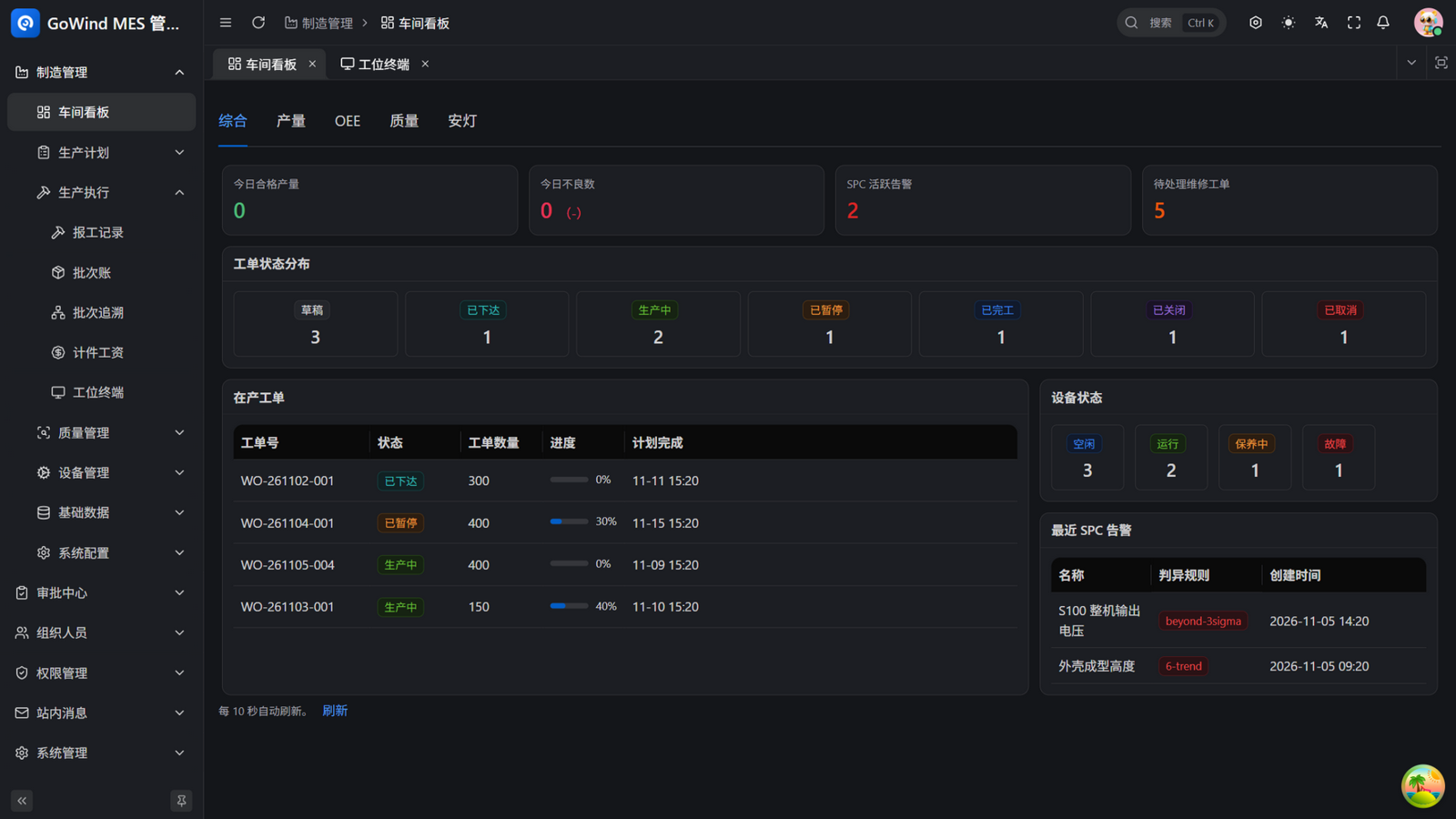
8:00 AM, the planner opens the shop-floor dashboard: today's target, in-production orders, active SPC alerts, and pending maintenance orders on one screen. One order looks tight on delivery — she runs an insertion simulation to preview its impact on the current schedule. Nothing is saved until she confirms; the live schedule stays untouched.
9:00 AM, the warehouse: before releasing a work order, a kitting check compares BOM requirements against available batch inventory, so shortages surface early. When material reaches the line, the feeding guard scans and verifies each batch against the BOM — wrong material is stopped before it ever reaches the machine.
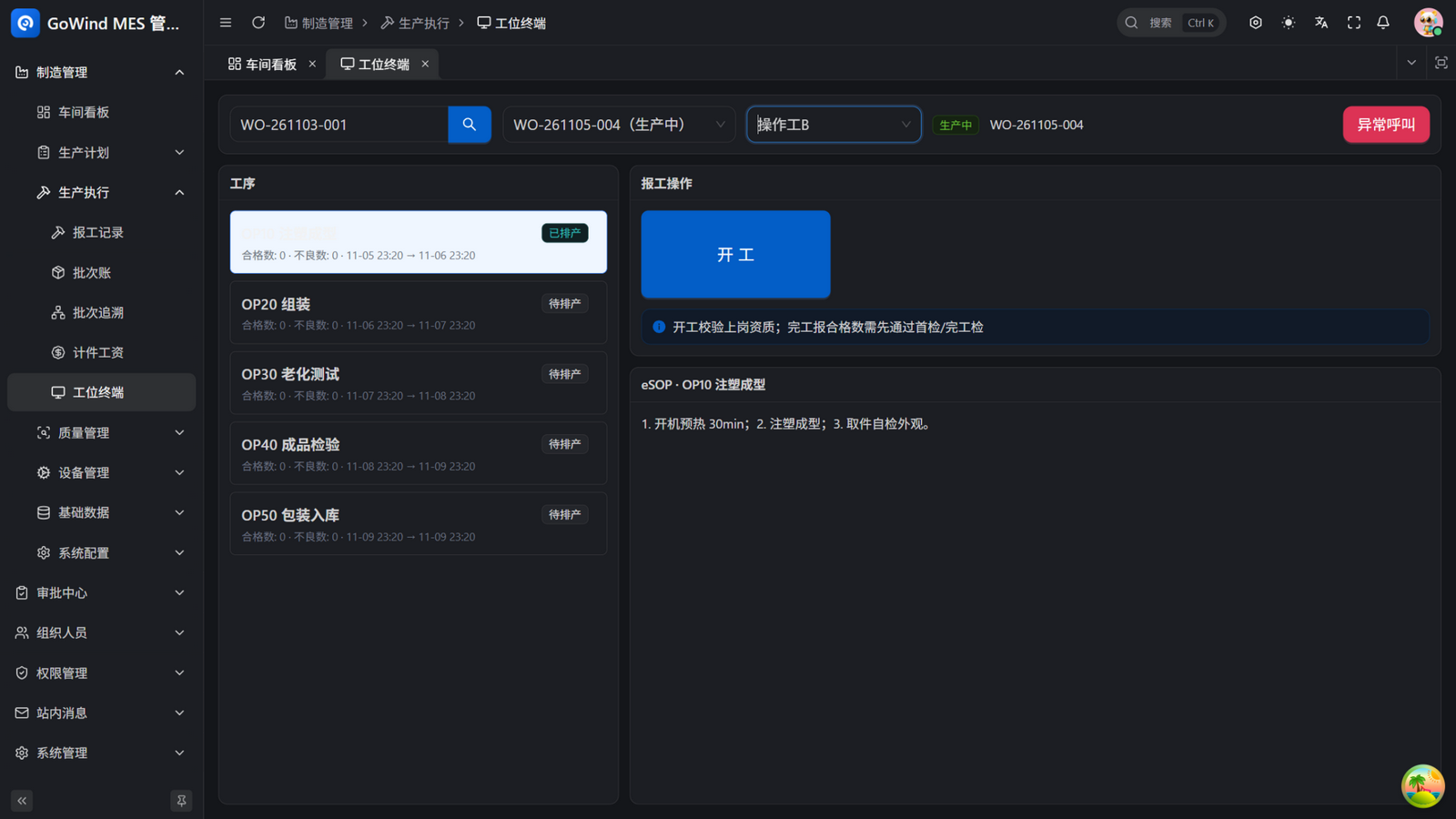
9:30 AM, operators clock in: at the workstation they open the Workstation Terminal, scan the work-order code, and land on their own operation. Four big buttons — Start / Pause / Resume / Complete — handle the whole shift by scanning. The electronic SOP shows the work instructions beside them; one tap on Andon call alerts the team leader instantly.
2:00 PM, the inspector runs a patrol inspection from the inspection item template and registers a defect on the spot. The nonconforming unit goes through MRB review; the disposition (rework / use-as-is / scrap) writes back to the batch automatically. When deeper analysis is needed, a CAPA (8D) is raised in one click — root cause to corrective action, all tracked.
4:00 PM, a customer complaint: a speaker hums. The agent types the serial number on the unit — forward traceability shows the finished-goods batch, backward traceability reveals the shell batch, the speaker batch, which machine, which shift, and every inspection it passed. Thirty seconds for the full story; a recall list is generated automatically with the affected scope.
6:00 PM, the plant manager switches the shop-floor screen to the quality theme for FPY and RTY, then to the OEE theme for per-machine availability / performance / quality, and then to the energy theme to see which machine consumed the most power today and whether per-unit consumption is within bounds. At month end, the plan-vs-actual report exports with on-time delivery tracked continuously.
This is the everyday GoWind MES designs for small factories — no process redesign required, just bring each step into the system naturally.
Highlights
- Six dashboard themes: Overview / Output / OEE / Quality (FPY, RTY, defect Pareto) / Andon (call sources & response times) / Energy (totals & per-unit consumption trends) — one screen per perspective, ready for shop-floor TVs
- Web Workstation Terminal: scan to start, four big action buttons, on-screen eSOP, one-tap Andon — runs on any regular PC, zero training for operators
- One-click automatic scheduling: multi-objective weighted scheduling balancing due dates, changeover minimization, and load leveling, with machine-level granularity, shift-calendar splitting (overnight shifts handled), freeze-period avoidance, insertion simulation (dry-run, nothing saved), and rework orders (one click from MRB rejection)
- Scan to report, wages in real time: work hours and piece-rate wages computed automatically with tiered rules; skill-matrix checks on Start and first-article/final-inspection gates on completion
- Batch genealogy + serial-number traceability: trace lots by batch, trace units by serial number, reach the full genealogy graph with one scan, and scope recalls automatically
- Kitting check & feeding guard: BOM vs available batches before release; wrong-material interception before it reaches the line
- End-to-end quality loop: incoming/first/patrol/final/OQC inspections, defect registration, MRB disposition written back to batches, CAPA-8D, SPC control charts (variables + attributes, Nelson rules, Cpk/Ppk), AQL sampling suggestions, recall lists, printable quality reports
- Predictive maintenance: live equipment health scores and failure probabilities, telemetry trend extrapolation ("likely to breach in N days"), and a closed alert-to-maintenance-order loop, driven by continuously evolving ML models
- Energy & per-unit consumption: equipment energy statistics compared against per-unit consumption (kWh/unit) trends — the electricity bill you never see during the day, saved here
- Visible equipment health: live status, OEE with planned-downtime distinction, downtime Pareto, auto-generated maintenance plans, spare-parts ledger with consumption loop, IoT threshold alerts opening maintenance orders automatically
Feature Overview
1. Shop-Floor Dashboard & Big Screens
| Feature | Description |
|---|---|
| Six themes | Overview / Output / OEE / Quality / Andon / Energy — switch freely, ideal for shop-floor TVs |
| Yield & quality overview | Today's qualified output, defects, and defect rate in real time |
| Proactive anomaly surfacing | Active SPC alerts, pending maintenance orders, abnormal equipment states in one place |
| In-production tracking | In-production orders with status, quantity, progress bars, and planned completion |
| Auto refresh | Refreshes every 10 seconds — leave it unattended |
| Custom report designer | Drag-and-drop BI reports and dashboards over output/OEE/energy/load/quality datasets, with printing and PDF export |
2. Planning & Scheduling
| Feature | Description |
|---|---|
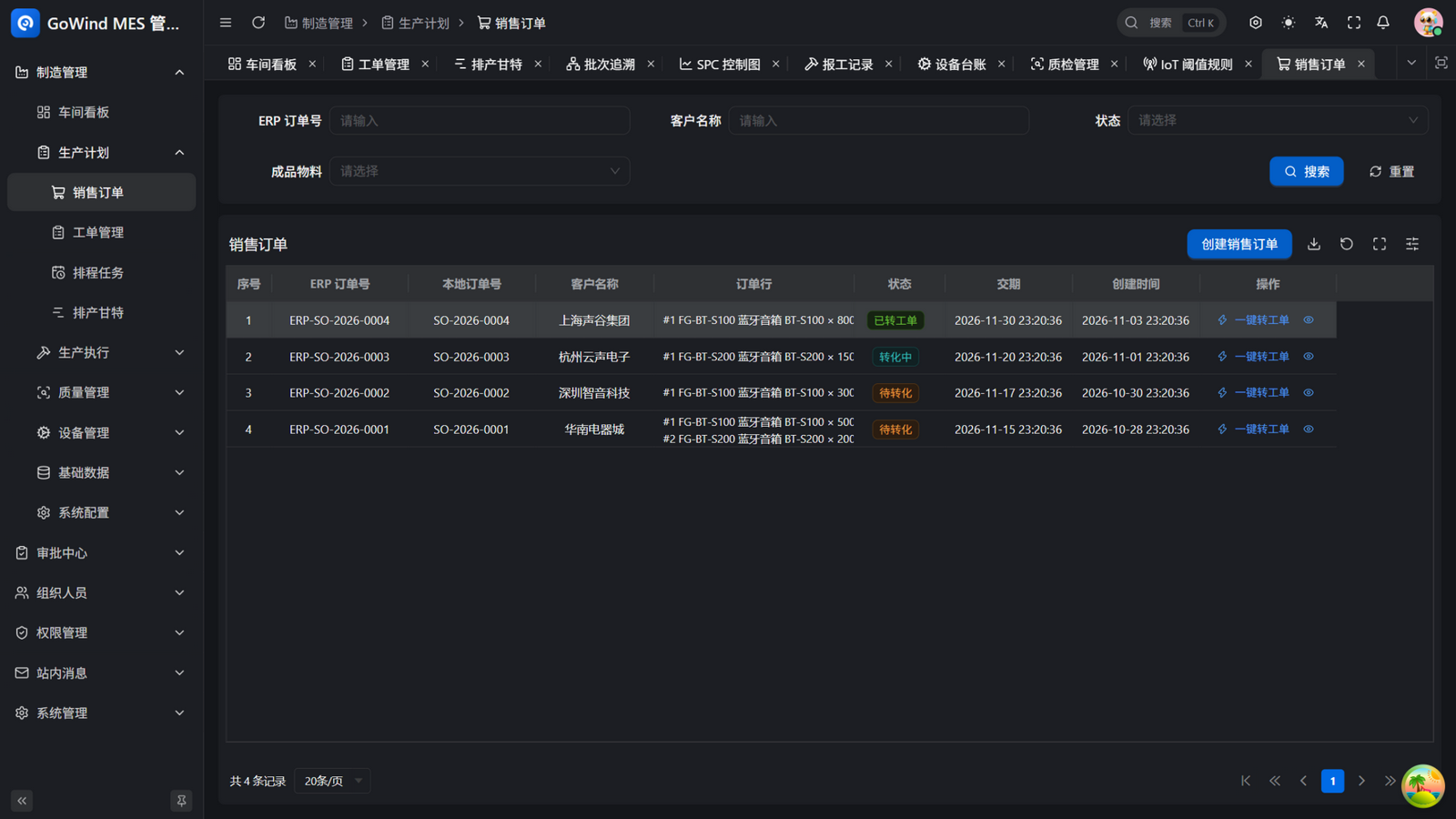
| Sales order sync | ERP sales orders sync into MES automatically, tracked at order-line level |
| One-click to work order | Convert a sales order into a production work order in one click, conversion status fully visible |
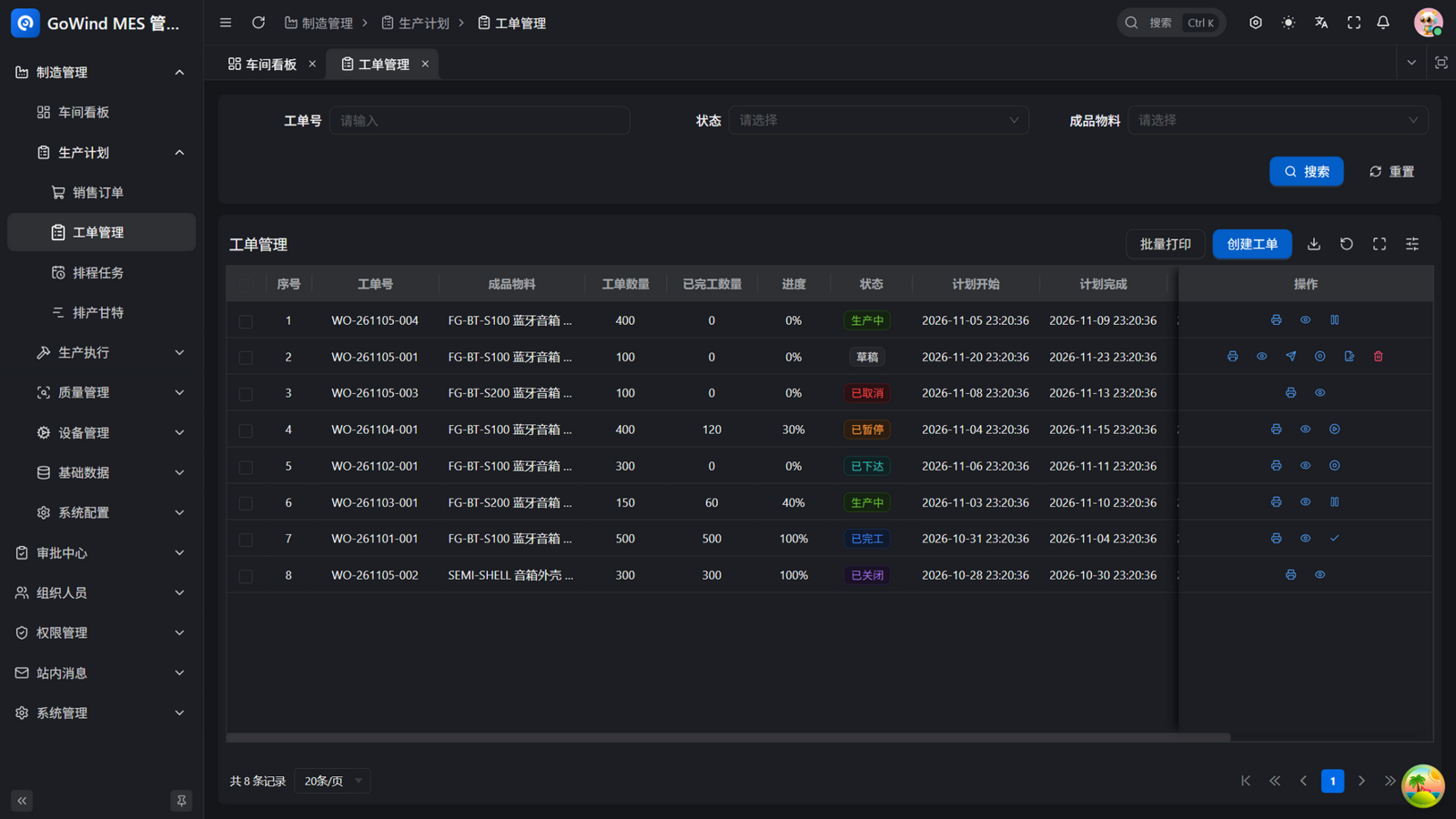
| Work-order state machine | Full lifecycle: draft, released, in production, paused, completed, closed, cancelled |
| One-click scheduling | Multi-objective weighted scheduling balancing due dates, changeover minimization, and load leveling, with machine-level granularity and the changeover matrix |
| Shift-calendar splitting | Schedule durations split by shift working windows; overnight shifts roll over automatically |
| Freeze-period avoidance | Scheduling automatically steers around planned freeze windows (stocktakes, line stops); manual moves are guarded too |
| Capacity load chart | Per-work-center 7-day load bars with overload warnings at a glance |
| Insertion simulation | Trial-run a rush order against the live schedule — dry-run only, commit when satisfied |
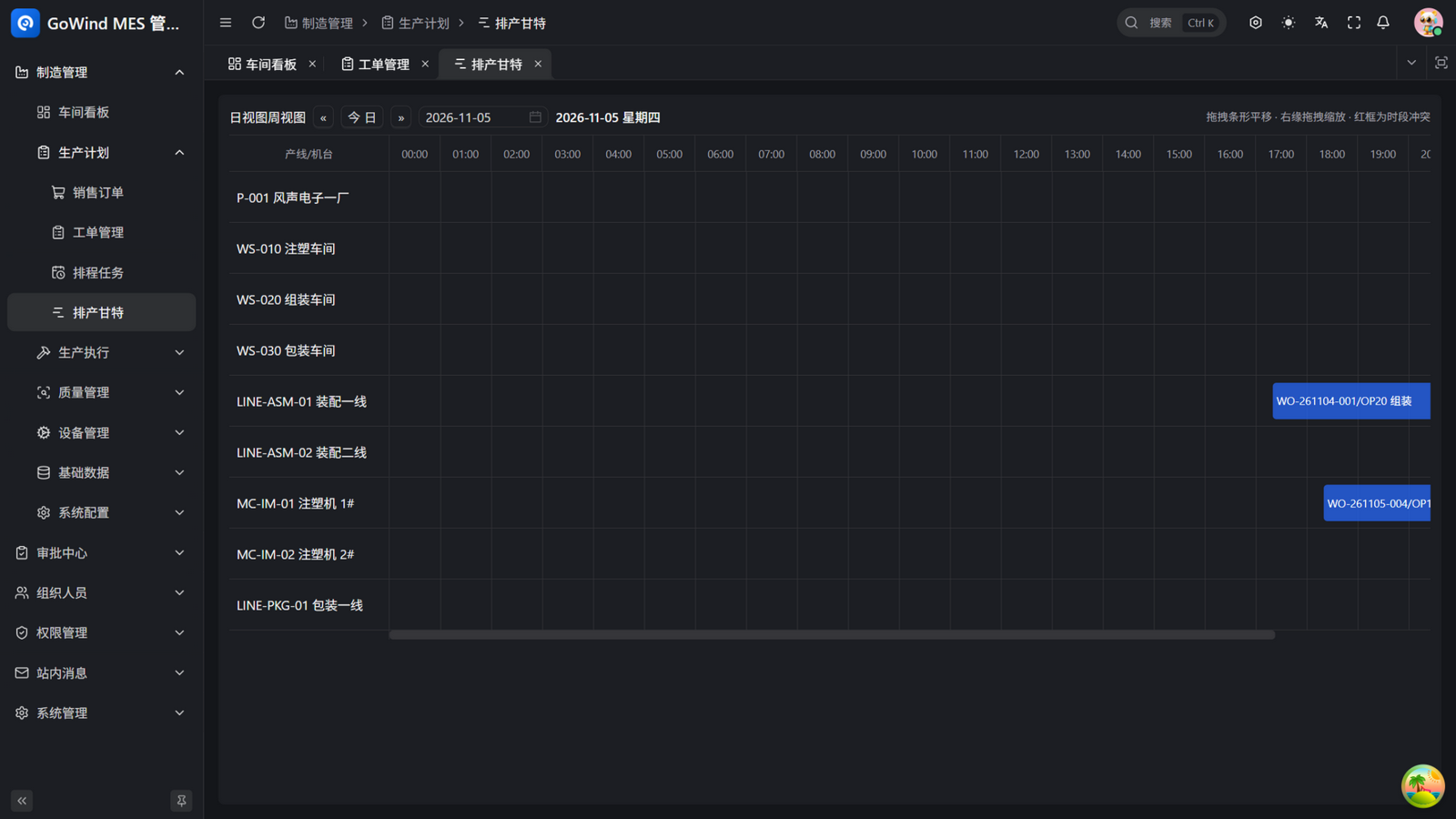
| Scheduling Gantt | Two-level line/machine view with drag panning, zooming, and red-box conflict highlighting |
| Plan-vs-actual analysis | Per-operation deviations and continuously tracked on-time delivery |
3. Production Execution
| Feature | Description |
|---|---|
| Workstation Terminal | Scan to start, four big action buttons, on-screen eSOP, one-tap Andon call, with kiosk full-screen mode and per-terminal memory |
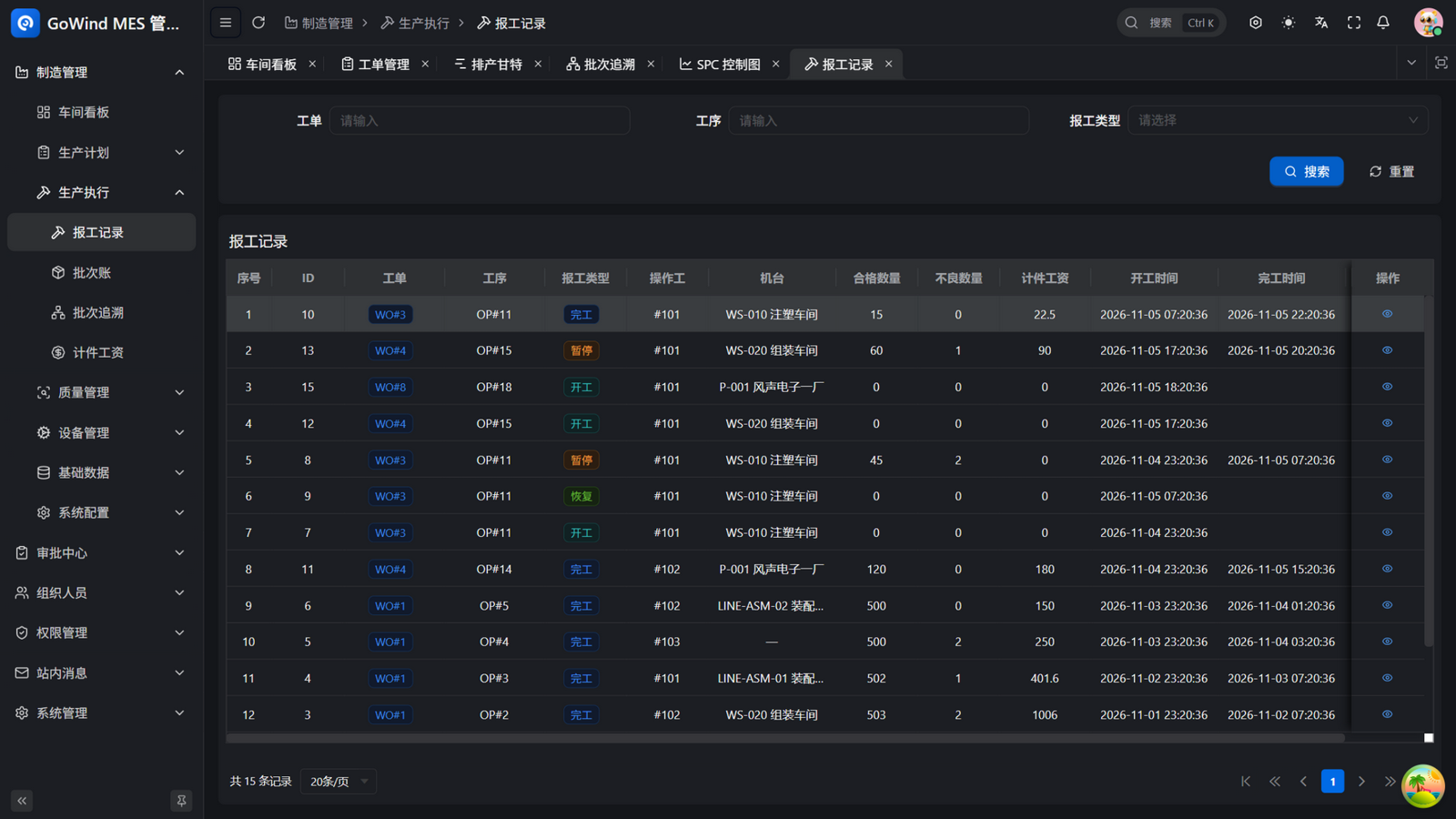
| Scan-based work reporting | Start, pause, resume, and complete via scans; work hours recorded automatically |
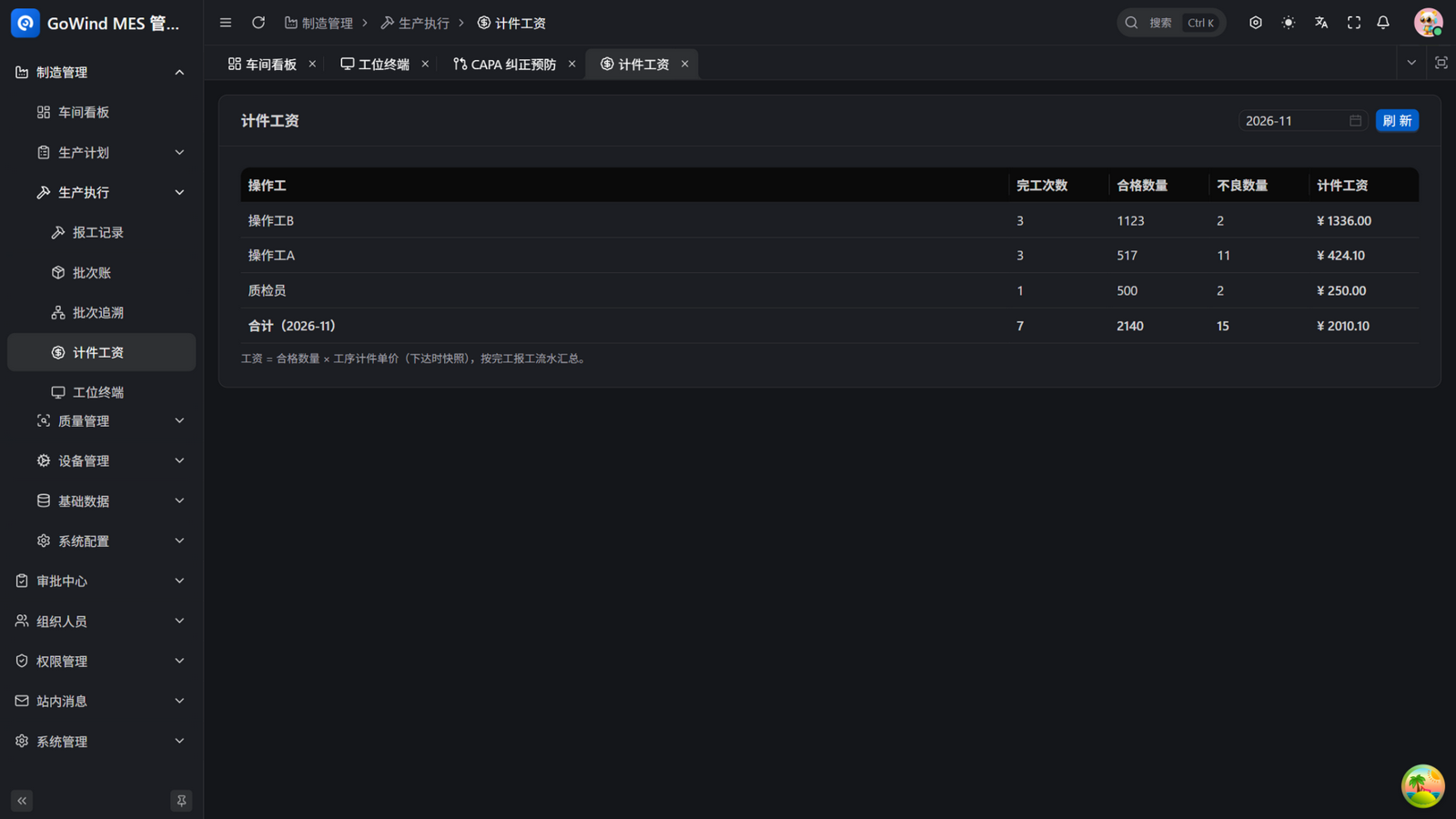
| Piece-rate wages | Reports link to piece rates automatically, with tiered rules; wages always computable |
| Kitting check | BOM vs available batch inventory before release — shortages surface early |
| Feeding guard | Scan-and-verify each batch against the BOM; mixed material stopped at the line |
| Serial-number tracing | SN generation, barcode label printing, one-scan access to unit genealogy; SN status cascades automatically on batch freeze/release/consumption; completion scans bind reports and inspections into an as-built unit dossier |
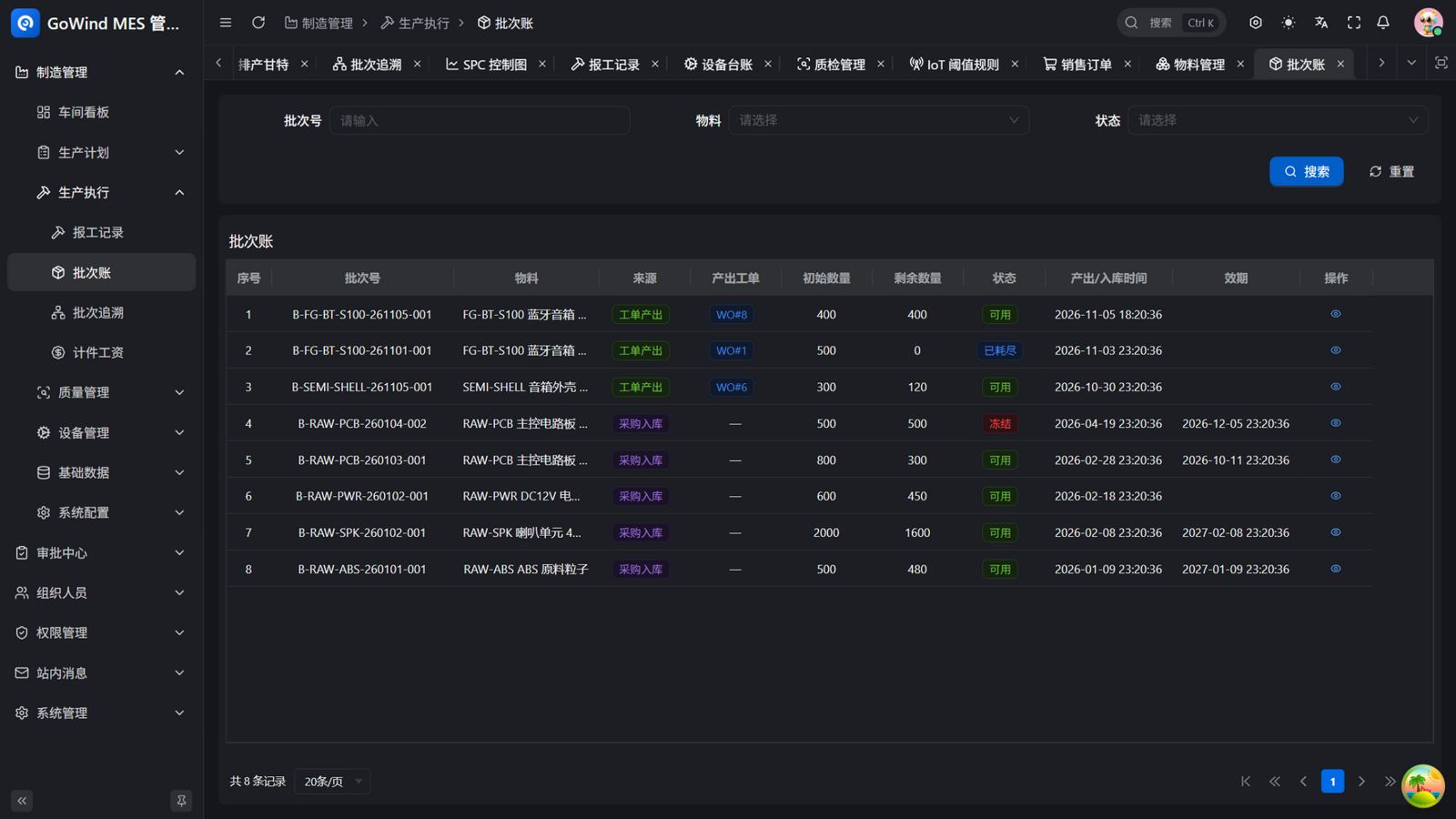
| Batch ledger | Dual-source batches (work-order output / purchase receipt) with quantity, status, and expiry at a glance |
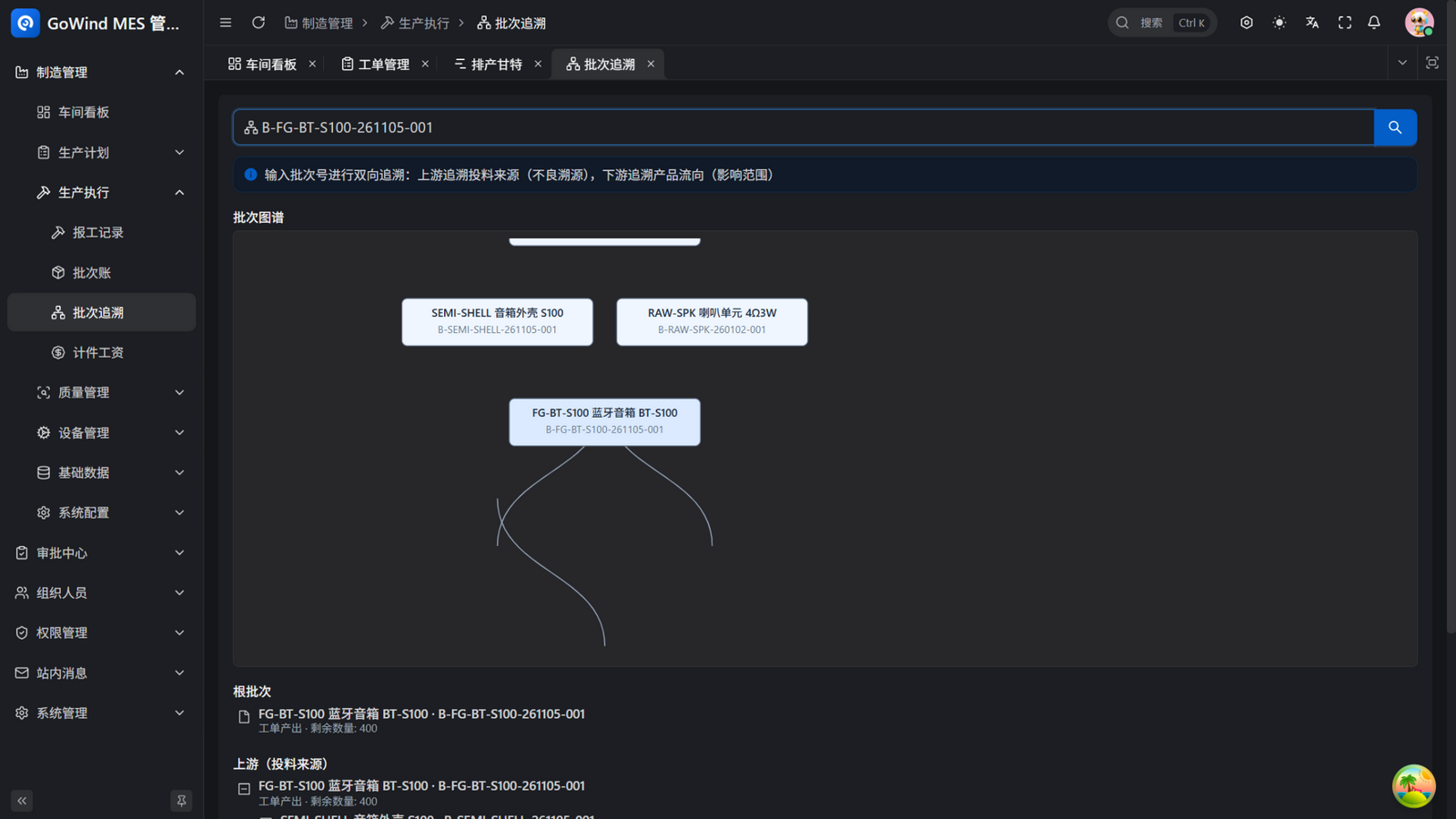
| Batch genealogy tracing | Bidirectional: trace upstream material sources (defect root cause) and downstream product flow (impact scope), in graph + tree views, with a one-click traceability-report PDF including the recall list |
| Electronic SOP | Work instructions attached per operation, mirrored on the Workstation Terminal, printable |
4. Quality Management
| Feature | Description |
|---|---|
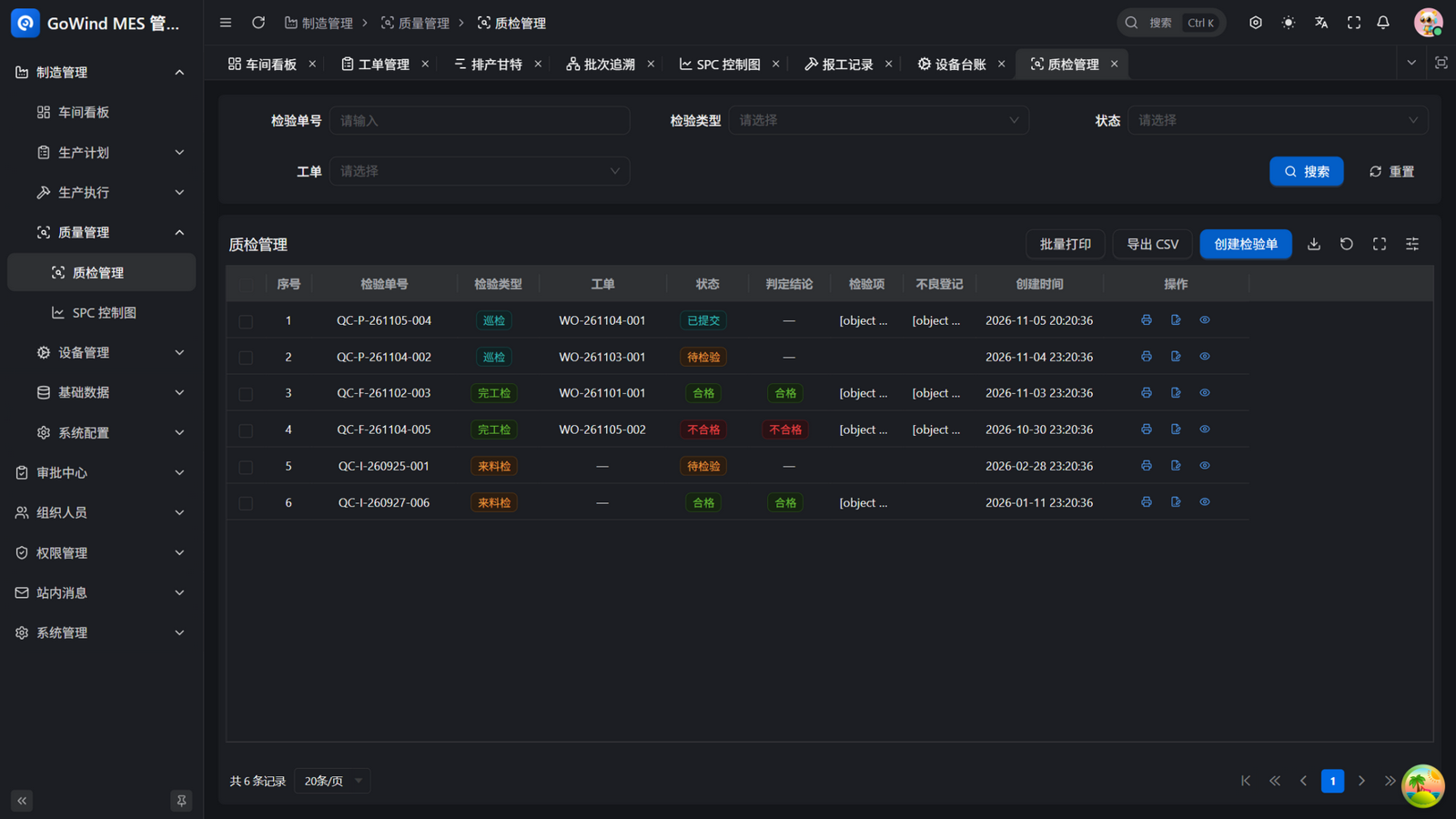
| Five inspection types | Incoming, first-article, patrol, final, and OQC shipment inspections |
| Inspection item templates & auto-raised inspections | Predefined items and standards per material/operation; work-order release raises the first-article inspection and completion raises the final inspection automatically — no item missed |
| First-article gate | Completion reporting is blocked until first-article passes |
| Auto patrol | Patrol tasks generated on schedule — nothing relies on memory |
| Defect registration & MRB | Structured records; MRB dispositions write back to batch status automatically |
| CAPA (8D) | Root cause (D4) through corrective action (D5) fully tracked; MRB freeze raises a CAPA automatically |
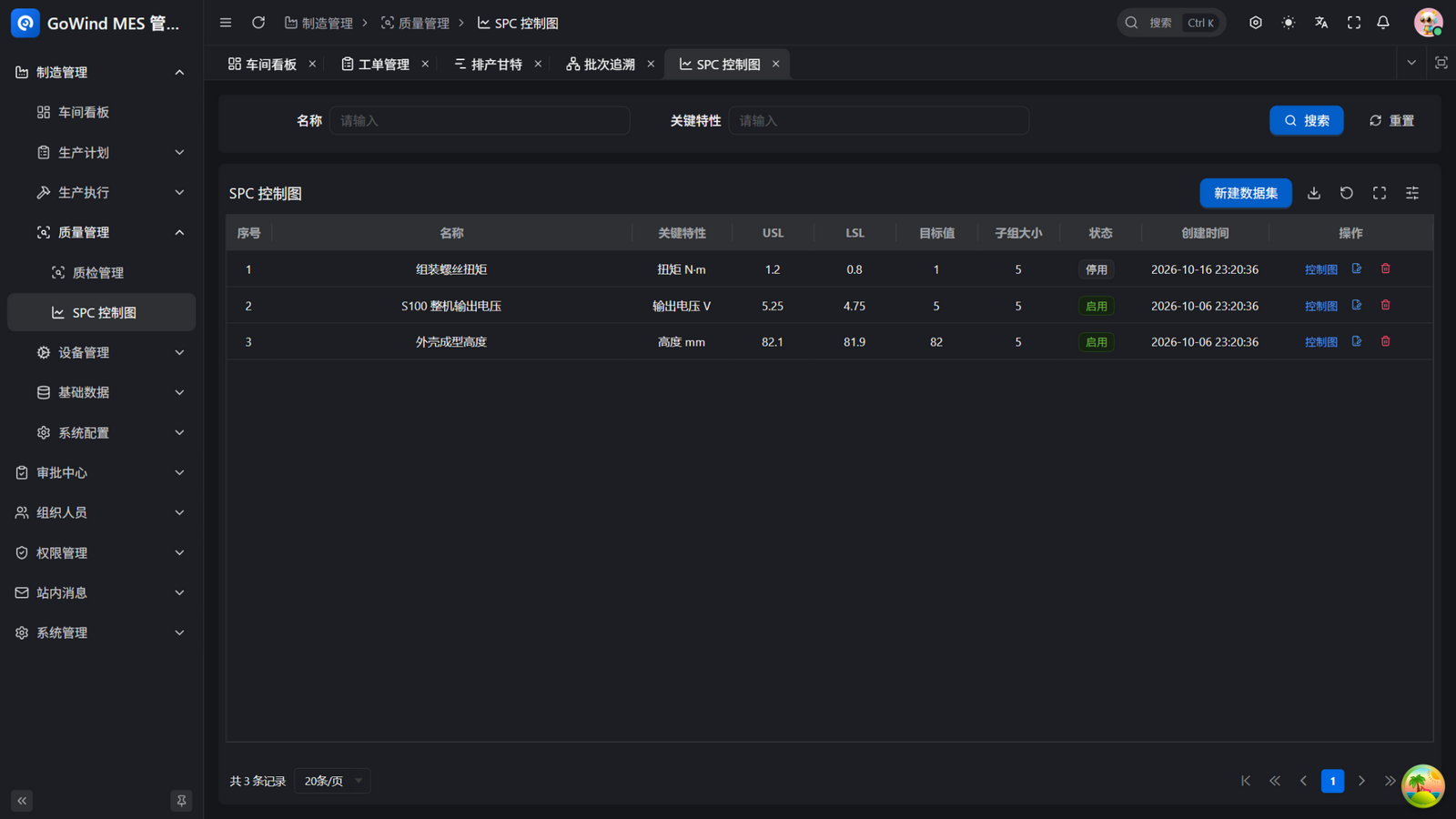
| SPC | Variables X̄-R charts plus attribute p/c/u charts, Nelson 1-8 rules, Cpk/Ppk, with alert acknowledge–disposition–closure trails |
| AQL sampling | Sampling plan suggestions from a simplified GB/T 2828.1 table |
| Recall lists | Affected scope scoped automatically by batch or serial number |
| Inspection photos | Defect photos archived with inspection records, retrievable any time |
| Quality reporting | Batch printing, FPY-RTY Pareto overview, CSV export, template-rendered PDF reports |
5. Equipment Management
| Feature | Description |
|---|---|
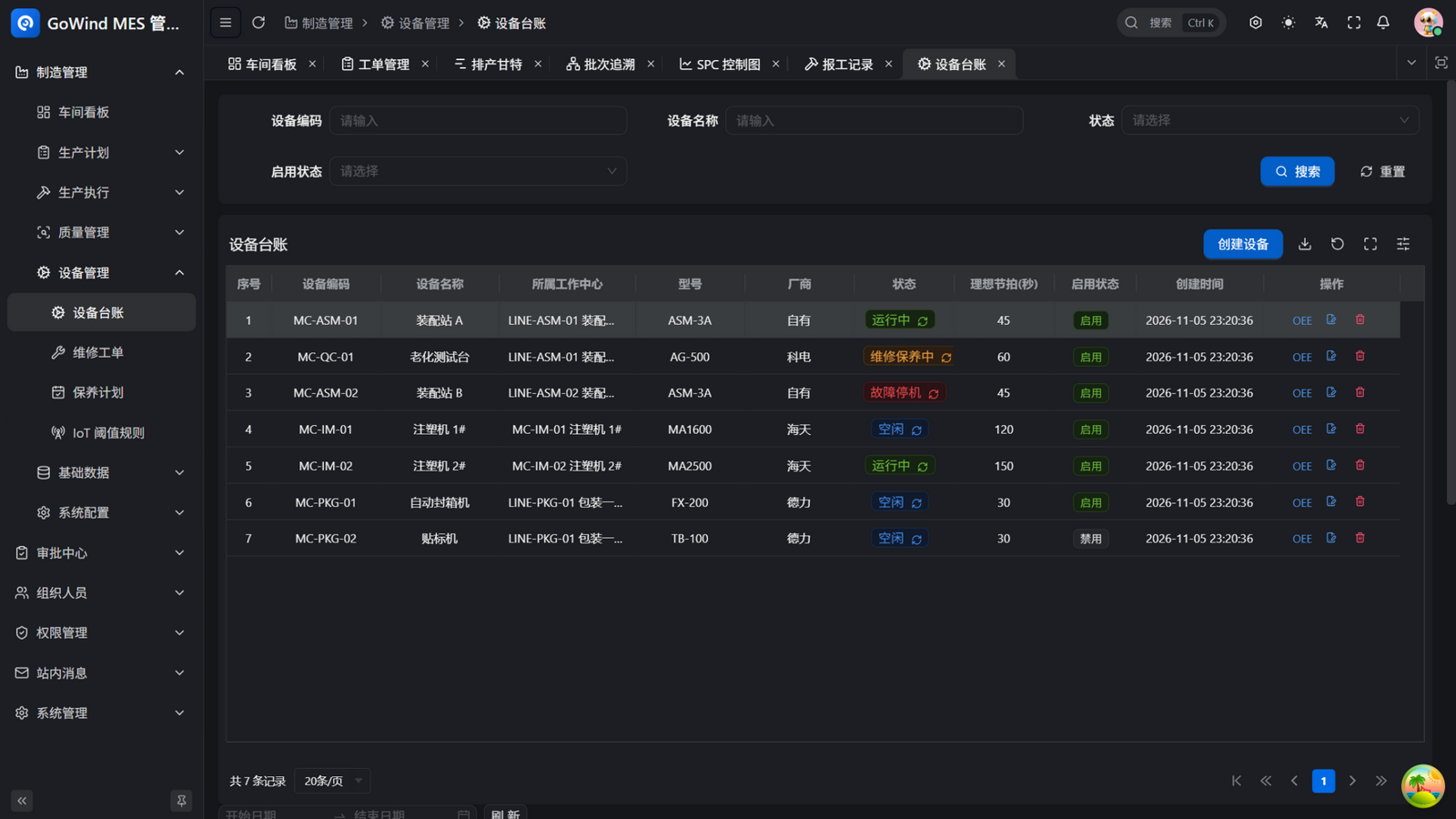
| Equipment ledger | Codes, models, vendors, and work centers managed in one place |
| Status tracking | Real-time idle/running/maintenance/down states with downtime reasons |
| Maintenance orders | Repair and maintenance orders flow through a state machine |
| Maintenance plans | Plans generated automatically so periodic upkeep is never missed |
| Point checks | Check plans generate point-check tasks on schedule with template items pre-filled; abnormal readings open maintenance orders automatically |
| OEE analysis | Availability/performance/quality computed live with planned downtime distinguished, hourly snapshots, trends, downtime Pareto, and per-order/product breakdown |
| Spare parts | Spare-parts ledger; maintenance consumption deducts stock and links to work orders — a closed EAM loop |
| IoT telemetry | GoWind IoT telemetry feeds in; threshold breaches open maintenance orders automatically |
| Andon response times | Call response and repair durations tracked automatically; overdue cases flagged in red |
| Energy analysis | Equipment energy statistics with per-unit consumption (kWh/unit) analysis, 7-day trends and period-over-period comparison |
| Mold & tooling | Design-life vs used-cycle ledger; cycles accumulate with work reports, and crossing the warning threshold opens a maintenance order automatically |
| Predictive maintenance | Live equipment health scores, failure probabilities, and health rankings; telemetry trend extrapolation ("likely to breach in N days"); a closed alert-disposition loop that opens maintenance orders in one click, driven by ML model inference |
6. Master Data
| Feature | Description |
|---|---|
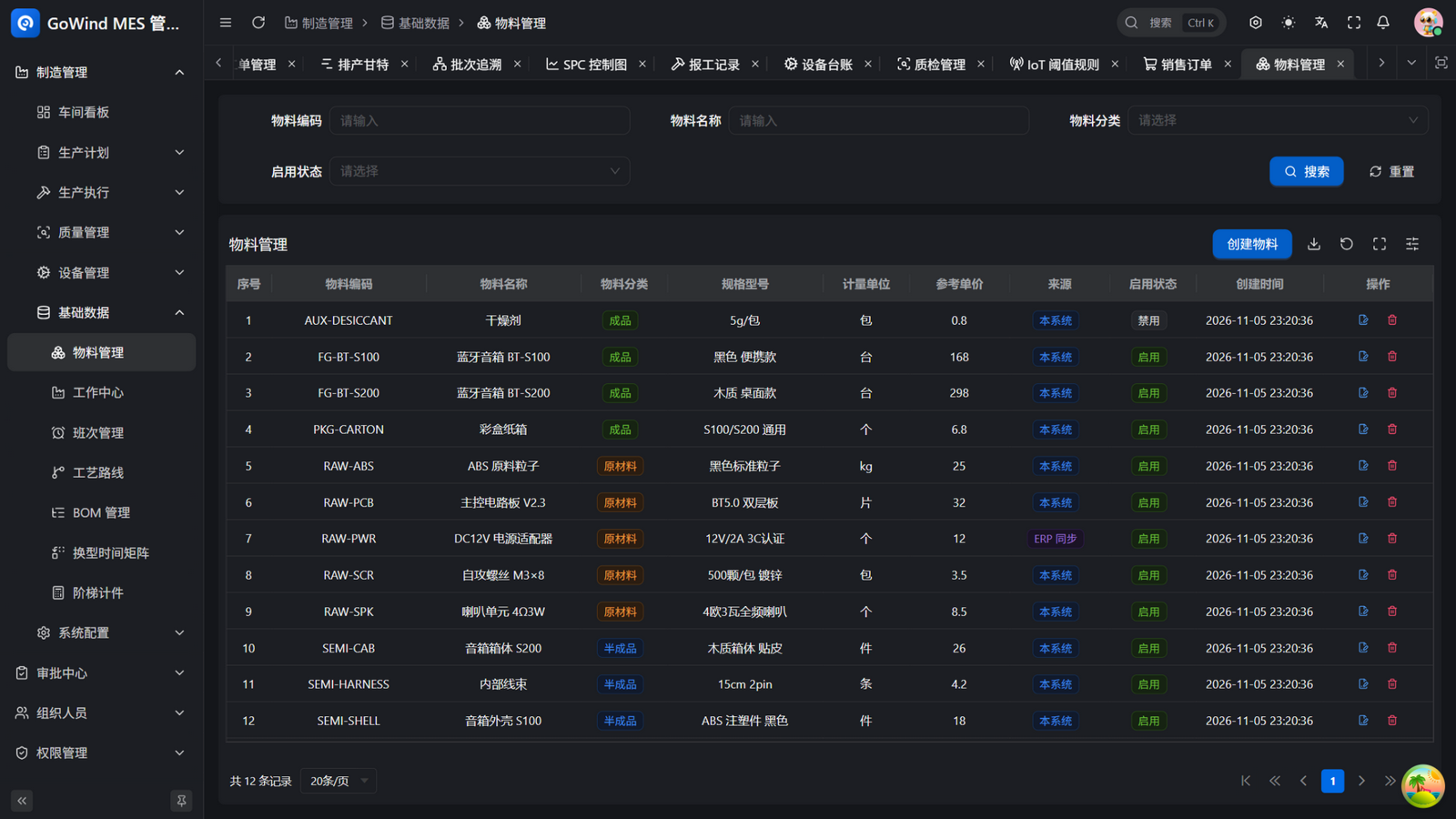
| Materials | Finished goods, semi-finished, and raw materials, with ERP-sync source labels |
| BOM | Multi-level bills of material linked to work-order issues and batch outputs |
| Work centers | Factory–workshop–line–machine tree: the shared coordinate for scheduling and reporting |
| Process routes | Operations, standard hours, piece rates, and electronic SOPs maintained together |
| Shifts | Shift definitions with wage multipliers (e.g., night-shift piece-rate uplift), so work reports and wage calculations attribute correctly |
| Changeover matrix | Machine-level changeover time matrix backing scheduling intervals |
| Tiered piece rates | Multi-tier piece-rate rules per output volume |
| Skill matrix | Employee skill certifications; the terminal checks qualification on Start |
| Spare parts | Spare-parts stock with a closed consumption loop |
7. Platform Foundation
| Feature | Description |
|---|---|
| Organization & permissions | Multi-tenancy, departments, positions, and roles out of the box |
| Approval flows | A general approval center, including MRB dispositions |
| In-app messaging | To-dos, reminders, and Andon calls delivered in-app |
| Audit logs | Every key operation is recorded |
| Print templates | Print templates and a canvas designer for orders, inspections, batch labels, and SN labels |
Screenshots
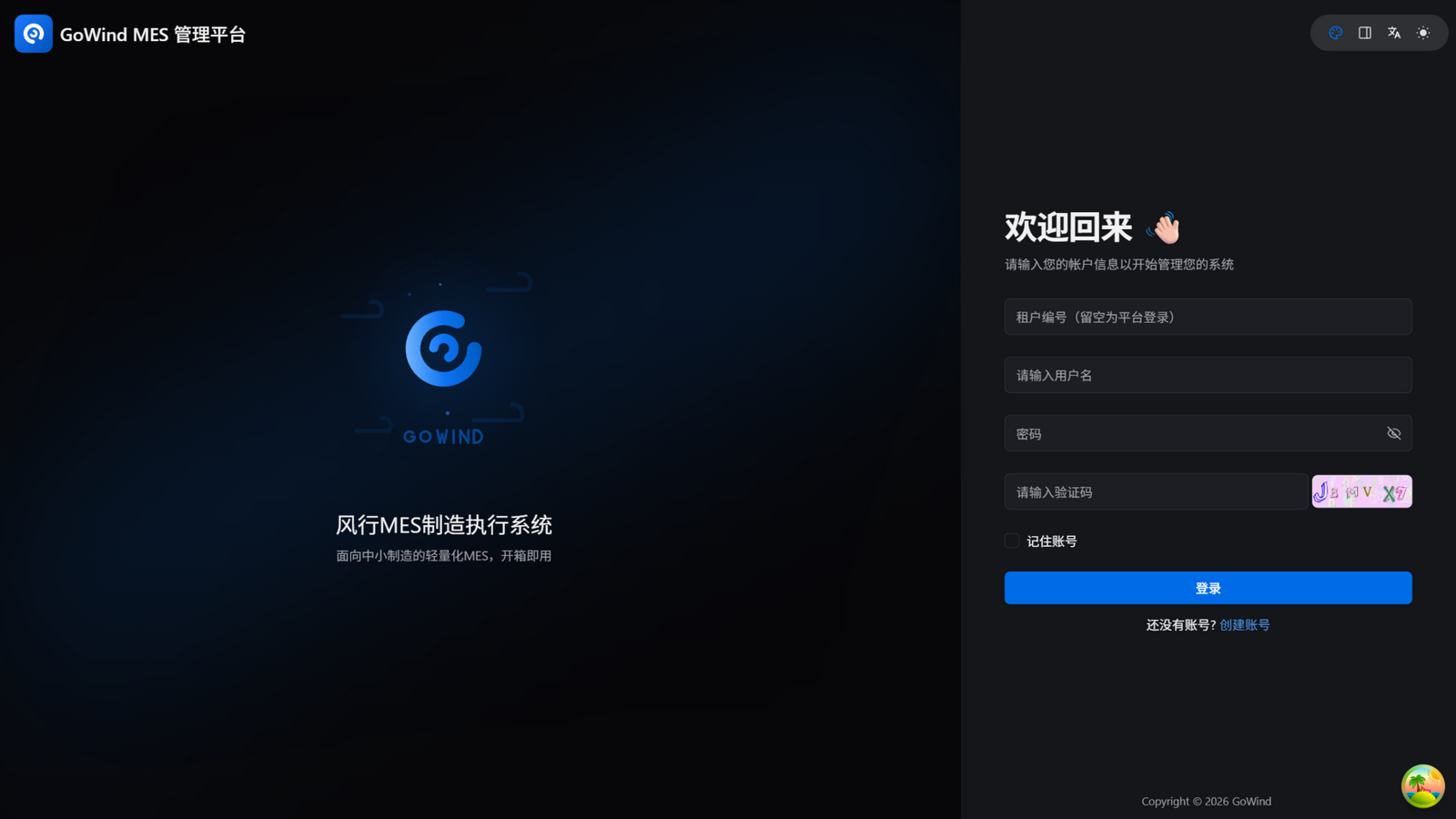
Login & Shop-Floor Dashboard
| Login | Dashboard (Overview theme) |
|---|---|
 |  |
Planning & Scheduling
| Sales Orders (ERP sync) | Work Orders |
|---|---|
 |  |
| Scheduling Gantt | Work Reports |
|---|---|
 |  |
Execution & Traceability
| Workstation Terminal | Batch Traceability |
|---|---|
 |  |
| Batch Ledger | Piece-Rate Wages |
|---|---|
 |  |
Quality & Equipment
| SPC Control Charts | Quality Management |
|---|---|
 |  |
| Equipment Ledger | Materials |
|---|---|
 |  |
Use Cases
- Final assembly & electronics manufacturing: multi-operation assembly lines for Bluetooth speakers, small appliances, and consumer electronics — work orders, piece-rate reporting, and finished-goods batches managed end to end
- Industries requiring batch/serial traceability: one scan answers "which material lot, which machine, which operator" — root-causing defects and scoping recalls fast
- Digitalizing shop floors off paper and Excel: an out-of-the-box platform foundation with no consultant needed; dashboard + workstation terminal make progress visible in real time
- Factories putting 8D/SPC into practice: CAPA, SPC control charts, AQL sampling, and recall lists turn quality-system paperwork into daily system actions
- Factories moving from fix-after-failure to predictive upkeep: equipment health scores and trend extrapolation put maintenance ahead of failures
- Factories already on GoWind ERP: sales orders sync in and convert to work orders in one click — a natural procure-produce-receive chain
Delivery & Deployment
GoWind MES ships as a private deployment and shares the same stack as the rest of the GoWind family. It runs standalone, or together with GoWind ERP and GoWind IoT as an integrated manufacturing digitalization solution. The Workstation Terminal runs in any regular browser — no special hardware required. Deployment documentation is provided with delivery — contact us below for trials and deployment services.
Contact
Reach us on WeChat at yang_lin_bo (note MES - Company - Name), or by email at yanglinbo@gmail.com for product trials, private deployment, and custom development.