
Student Client Guide
The student client comes in two forms, WeChat Mini Program and H5, usable right after registration and sign-in. Five tabs are fixed at the bottom of the page: Home, Practice, Review, Wrong-Question Notebook, Mine, corresponding to Today's Tasks, starting practice, the review plan, wrong-question management, and personal learning analytics.
This guide follows a real learning journey: registration → Today's Tasks → practice → answering and anti-cheating → wrong-question notebook → review plan → post-exam review → learning analytics report → Growth Center → AI tutor → homework, favorites, and notes → WeChat reminders and parent access.
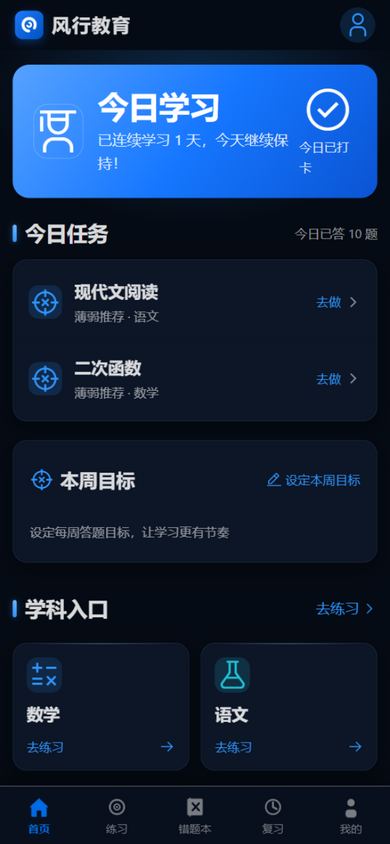
The student home screen, "Today's Tasks": weak-point recommendations put today's most worthwhile knowledge points up front, while check-in streaks and weekly goals help learning find its rhythm:
About accounts
Student accounts support self-registration: after deployment, the school / institution publishes the access URL; students enter through it, register and sign in, then join their class with a class join code. Teacher accounts are created centrally by the administrator — students don't need to worry about them.
1. Sign-In and Today's Tasks
After registering and signing in, the home page is "Today's Tasks" — the entry point to each day's learning:
- Consecutive study-day streak: tracks consecutive days of study, helping build the habit of learning a little every day;
- Weekly goal ring: set your own weekly answering goal (10–500 questions) and watch progress in real time — big goals broken into week-sized steps;
- Aggregated to-dos: everything that must be handled today is on one page, including —
- Reviews due today: review tasks due today;
- Homework due soon: assignments approaching their deadlines;
- Weak-point recommendations: weak knowledge points worth practicing today, based on your answering data;
- In-class quick tests in progress: when the teacher launches a quick test, a countdown card appears on the home page — tap to enter right away (timed, one attempt only).
Each day, students open the home page and know "what to do today", without hunting across features.
2. Starting Practice
The "Practice" tab offers two entries:
| Entry | Selection method | Suitable scenario |
|---|---|---|
| Smart practice | Problems selected automatically by weak knowledge points | Daily consolidation, when you don't know what to practice |
| Focused practice | Self-chosen subject, knowledge points, volume, and question types | Targeted breakthrough on a specific knowledge point or question type |
Whichever entry you take, five answering modes are available:
| Mode | Description | Suitable scenario |
|---|---|---|
| Practice mode | Learn while doing; objective questions are scored instantly | Daily drills, after-class consolidation |
| Exam mode | Timed answering; answers submit automatically when the countdown ends | Mock exams, checking your true level |
| Wrong-question redo | Redo the problems in your wrong-question notebook | Eliminating wrong questions |
| Review mode | Complete review tasks that are due | Scientific review along the forgetting curve |
| Variant drills | Complete AI-generated variants of your wrong questions | Drawing inferences, preventing "answer memorization" |
Where weak knowledge points come from
"Weak knowledge points" come from your answering history: the more often you get a knowledge point wrong, the more likely smart practice picks it. Keep completing the recommended practice and weak points are gradually eliminated — the system will recommend them less and less.
3. Answering and Anti-Cheating
Key mechanics during answering:
- Instant scoring for objective questions: multiple choice, true/false, and other objective questions score immediately on submission — you know right away whether you were correct;
- AI grading for subjective questions: solutions, essays, and other subjective questions are graded asynchronously by AI; when the score arrives it comes with comments you can self-assess against;
- Photo answers: short-answer and essay questions can be typed or photographed (up to 3 photos) — AI grades against the image content, so handwritten work and essays can be submitted too;
- Paragraph-level annotations: when grading subjective answers, AI quotes your original text and comments paragraph by paragraph — what's good, what's off, like a teacher marking up your paper;
- Explanation videos: when a teacher attaches an explanation video to a question, it plays right below the analysis;
- Answer timing: time spent per question is visible for each item — you'll notice if you answered too fast;
- Exam countdown: in exam mode the page shows a countdown, and answers submit automatically when time is up — no worrying about forgetting to submit;
- Leaderboard: paper exams with rankings enabled generate a leaderboard, so you can see where you stand in the class.
Take exams seriously and answer independently
In exam mode, questions and options are shuffled, so every student may see a different order; the number of times you switch away from the page is recorded, and teachers can see each student's page-switch count in the console, with alerts on anomalies. Answer independently, as you would in a real exam.
Paper exams may also carry controls set by the teacher: attempt limits (only N attempts), time limits (a cap on each attempt's duration), and time windows (entry allowed only within a specified period). Read the exam instructions before entering, and make sure you are in a suitable environment with enough time.
4. Wrong-Question Notebook: Eliminate Every Wrong Question
The "Wrong-Question Notebook" tab is one of the most valuable modules on the student side:
| Capability | Description |
|---|---|
| Automatic collection | Problems you get wrong enter the notebook automatically — no manual organizing |
| Repeated mistakes accumulate | Getting the same problem wrong again adds to its record, showing just how stubborn it is |
| Error-cause tagging | AI infers the cause automatically and pre-fills it (unclear concept, calculation slip, misreading, etc.); edit it if it seems off — your tag always takes priority |
| Photo-captured wrong questions | Photograph paper problems from outside class; AI recognizes them into your notebook and generates a review plan, so off-campus mistakes join the same review rhythm |
| Similar-problem recommendations | Problems similar to your wrong questions are recommended automatically, so you master a knowledge point thoroughly |
| AI variant drills | Have AI generate variant problems from your wrong questions; variants are kept private per student and don't affect one another |
| Filter by knowledge point | Filter the notebook by knowledge point to focus on one category of problems |
| Wrong-question compilation | All unmastered wrong questions grouped by cause into a printable compilation — print and conquer before exams |
| Problem correction | Spot a problem with the question itself? Report it to the teacher in one tap; you'll be notified when it's resolved |
| Remove once mastered | After truly mastering a problem, remove it from the notebook so it always holds what's "left to eliminate" |
Best use of the wrong-question notebook
Do one "wrong-question redo" session at a fixed time each week: first review the error-cause tags, then redo the problems, and finally use "variant drills" to confirm you truly understand rather than memorized the answer. Remove problems promptly once you answer them consistently right — the shorter the notebook, the more efficient the review.
5. Review Plan: Put the Forgetting Curve to Work
The Principle: Ebbinghaus + SM-2, Explained for Parents Too
Psychology has a famous "Ebbinghaus forgetting curve": knowledge that isn't reviewed fades quickly at first, then more slowly — most of it is lost in the first day or two, after which the pace of forgetting gradually eases. The most effective way to fight forgetting is to review right around the moment you're about to forget, and to stretch the intervals between reviews longer and longer.
GoWind Edu's review plan runs exactly on this principle, automatically:
- Automatic generation: wrong questions automatically produce a review plan based on the Ebbinghaus forgetting curve — no arranging by students or parents;
- SM-2 (spaced repetition) adaptive intervals: each review's next date is decided by the SM-2 algorithm — if you answer correctly, the memory is holding, so the next interval lengthens; if you answer incorrectly, the memory isn't set, so the interval shortens and re-practice is scheduled sooner. Every student's rhythm for every problem is unique;
- Due reminders: when a review task comes due, an in-site message reminds you — with WeChat reminders enabled, it's pushed straight to WeChat too, so nothing is missed;
- 7-day review calendar: the "Review" tab provides a calendar for the next 7 days, showing at a glance how many review tasks each day holds;
- Review statistics: the top of the Review page shows completion in real time (total / done / pending / overdue) plus cumulative review time.
A note for parents
The review plan needs no extra supervision: after your child completes the day's review tasks, the system schedules the next review automatically. You only need to watch two things — whether due tasks in the "Review" page are cleared to zero, and whether the consecutive-day streak on the "Mine" page is stable.
6. Post-Exam Review: AI Helps You Revisit the Whole Paper
After taking a paper exam, beyond the score and leaderboard, you also get a post-exam review:
- AI whole-paper commentary: the AI reads the entire answer sheet and gives an overall assessment;
- Lost-points breakdown: a breakdown of where points were lost, by knowledge point and question type;
- Practice suggestions: suggestions for follow-up practice, with one-click generation of a practice paper to start targeted remediation immediately.
An exam ends as a complete loop of "exam → review → remediation", not just a score.
7. My Learning Analytics
The learning analytics report in the "Mine" tab helps students and parents grasp overall progress:
| Metric | Description |
|---|---|
| Cumulative answers | Total number of questions answered |
| Accuracy | Overall answer accuracy |
| Consecutive days | Consecutive days of study check-ins |
| Subject mastery | Mastery assessment for each subject |
| Learning path | Knowledge points to conquer ordered by weakness, each step paired with an AI explainer card and targeted practice |
| Study calendar | A 90-day check-in heatmap — consistency at a glance |
| Score trends | Score curves across exams and in-class quick tests — progress at a glance |
| Mastered knowledge points | The number of knowledge points you have mastered |
| 30-day trends | Trends in answer volume and accuracy over the last 30 days |
| Class answer leaderboard | Your position on the class's answer-volume leaderboard |
Knowledge points left unpracticed for a long time slowly decay in mastery and re-enter weak-point recommendations — analytics always reflect the current reality. Explainer cards also offer a self-test mode: only the knowledge-point name shows first; tap to reveal the content. Active recall makes memories stick.
8. Growth Center: Weekly Reports, Badges, and Custom AI Practice
- AI weekly learning report: generated automatically every Monday for the previous week (highlights, gaps, suggestions); missed reports can be regenerated manually;
- Achievement badges: 12 badges tracking learning milestones — first answers, answer volume, consecutive study days, knowledge points mastered, wrong questions eliminated, reviews completed, AI practice, and more — each with live progress;
- AI conversational practice: tap "AI practice set" in the AI tutor page and AI composes a custom mini-paper from your weak knowledge points, ready the moment it's generated; the questions are private to you and never enter the shared bank.
9. AI Tutor: A Q&A Teacher Who's Always Online
The AI tutor is the intelligent Q&A entry point across the platform, with five main traits:
- Personalized Q&A: tutoring is grounded in your wrong-question notebook, prioritizing problems you actually got wrong rather than generic explanations;
- Photo-based problem recognition: when you hit a problem you can't solve, photograph it to recognize the question and get an explanation;
- Guided mode: when enabled, the AI only hints at the approach without giving the final answer — inspiring you to think first, then going deeper step by step if you truly can't;
- AI practice set: have AI compose a custom practice paper from your weak points on the spot — generate and go;
- Conversation history: all Q&A has history records, so you can revisit earlier questions anytime.
Why guided mode matters educationally
Looking at the answer directly only creates the illusion of "I get it" — the next similar problem still stumps you. In guided mode, the AI asks back, hints, and builds stepping stones like a patient teacher, letting your child complete the thinking process alone — exactly what separates an "AI tutor" from a "search-the-answer app". We recommend parents turn on guided mode.
10. Homework, Favorites, and Notes
- Homework: pending assignments are aggregated in Today's Tasks; the homework module splits into "Pending" and "Submitted" with deadlines shown clearly, so nothing slips through. Automatic deadline reminders: 24 hours before the deadline, the system automatically reminds everyone who hasn't submitted (in-site + WeChat) — even if the teacher forgets to chase;
- Favorites: bookmark great and representative problems for concentrated review before exams;
- Notes: jot down notes while solving problems, capturing solution insights as they occur.
11. WeChat Reminders and Parent Access
- WeChat reminders (Mini Program): after binding WeChat in settings and completing the subscription, reviews due, homework chasing, grading done, and weekly reports are pushed straight to your WeChat; choose which events notify you under "Notification preferences";
- Parent binding: generate a 10-minute, 6-digit invitation code from the "Mine" menu and send it to your parent; after the parent registers / signs in to the student client, they enter the code on the "Parent page" to bind — then they can view your learning overview, weekly reports, and homework completion, with weekly reports pushed automatically.
12. FAQ
Q: When do subjective questions get scored? A: Subjective questions are graded asynchronously by AI, not instantly on submission. Wait a moment after submitting, then check your practice records or the homework list — the score arrives with AI comments.
Q: Are variant drill problems the same as my classmates'? A: No. AI variants are generated privately per student — each student gets different variants based on their own wrong questions, so there is no "copying homework".
Q: Does switching pages once count as cheating? A: Page-switch counts are recorded and visible to teachers; whether to act on them is the teacher's judgment. During exams, stay on the answering page and don't switch out to look things up.
Q: Can I use it on a computer too? A: Yes. The student client comes as both a WeChat Mini Program and H5; H5 works in mobile and desktop browsers alike, with data synced in real time.
Q: What if there are too many review tasks to finish? A: Prioritize tasks marked "due for review" in Today's Tasks; correctly answered problems get longer intervals automatically, and after a while the daily review load settles at a reasonable level.
Q: What if a photo-captured problem is recognized incorrectly? A: The recognized text is shown first for review — you can delete and reshoot directly; captured problems follow exactly the same review plan as ordinary ones.
Q: How can parents see their child's learning? A: The student generates a 6-digit invitation code from the "Mine" menu and sends it to the parent; after the parent binds on the "Parent page" in the student client, they can view the learning overview, weekly reports, and homework completion — weekly reports are pushed automatically.
Further reading:
- Product Introduction: product positioning, core highlights, and deployment delivery.
- Teacher and Admin Guide: how teachers build questions, assemble papers, grade, and view learning analytics.