
GoWind IM Feature Manual
This manual is adapted from the official Product Feature Specification v1.0 (2026-10-30), corresponding to product version 3.6. It is written for end users and introduces, by functional domain, the operations and capabilities you can directly perceive and use. For the overall product positioning, edition licensing, and delivery model, see the Product Introduction.
Feature Map
| Functional domain | One-line positioning | Representative capabilities |
|---|---|---|
| Messaging | The main arena of daily communication | One-on-one chats, 10,000-member groups, channels, secret chat, topics, full-text search |
| Audio/video conferencing | Face-to-face communication, online | Multi-party meetings, host controls, cloud recording, group live streaming |
| Office collaboration | Administrative tasks handled on one platform | OA approvals, attendance, OKR, Base multi-dimensional tables, meeting rooms |
| Documents and knowledge | Team knowledge assets | Real-time co-editing, knowledge spaces, canvas replay |
| Project management | Task progress made visible | Kanban swimlanes, automation rules, burndown charts |
| Customer business | Business data in one place | CRM opportunity funnel, Customer 360, ERP |
| R&D collaboration | Development workflow brought into group chat | Code review, CI/CD build cards, DORA reports |
| Community and content | Internal company content ecosystem | Moments, short videos, group live streaming |
| Customer service | The external service window | Web visitor sessions, tickets converted into CRM |
| Security and administration | The compliance and control foundation | Watermarks, risk control, audit, retention and archiving |
| AI assistant | Intelligence across the whole platform | Summaries, translation, knowledge-base Q&A, AI minutes |
How to read this manual
Each functional domain lists "what you can do" — capabilities that users can directly perceive and operate in the UI. For product positioning, client form factors, edition licensing, and on-premise delivery, see the Product Introduction.
1. Messaging
| Feature | What you can do |
|---|---|
| One-on-one chats / 10,000-member groups | Private one-to-one chats, or groups of up to 10,000 members — an all-hands announcement reaches everyone at once |
| Channels | Broadcast-style publishing to everyone or to specific departments; subscribers are reached in a targeted way |
| Chat rooms | Open real-time chat scenarios, ideal for event interaction and temporary collaboration |
| Secret chat | Messages auto-recall on a timer, the other party's screenshots trigger an instant alert, and a hidden watermark is overlaid on the screen — confidential communication with greater peace of mind |
| Topic threads | Aggregate a stretch of group discussion into a topic; follow-up replies are archived together without disturbing others |
| Scheduled messages | Write now and schedule the send time — no more late nights for cross-time-zone collaboration |
| Message management | Recall, quote, forward, and favorite — all the everyday operations are there |
| Full-text search | Search messages and files across conversations and quickly recover past conclusions |
| Location sharing | Start real-time location sharing for field meet-ups and customer visits |
| Sticker store | Pick and collect stickers from the store to add warmth to team communication |
| Multi-device roaming | Sign in on your phone, desktop, and more — chat history syncs and roams automatically |
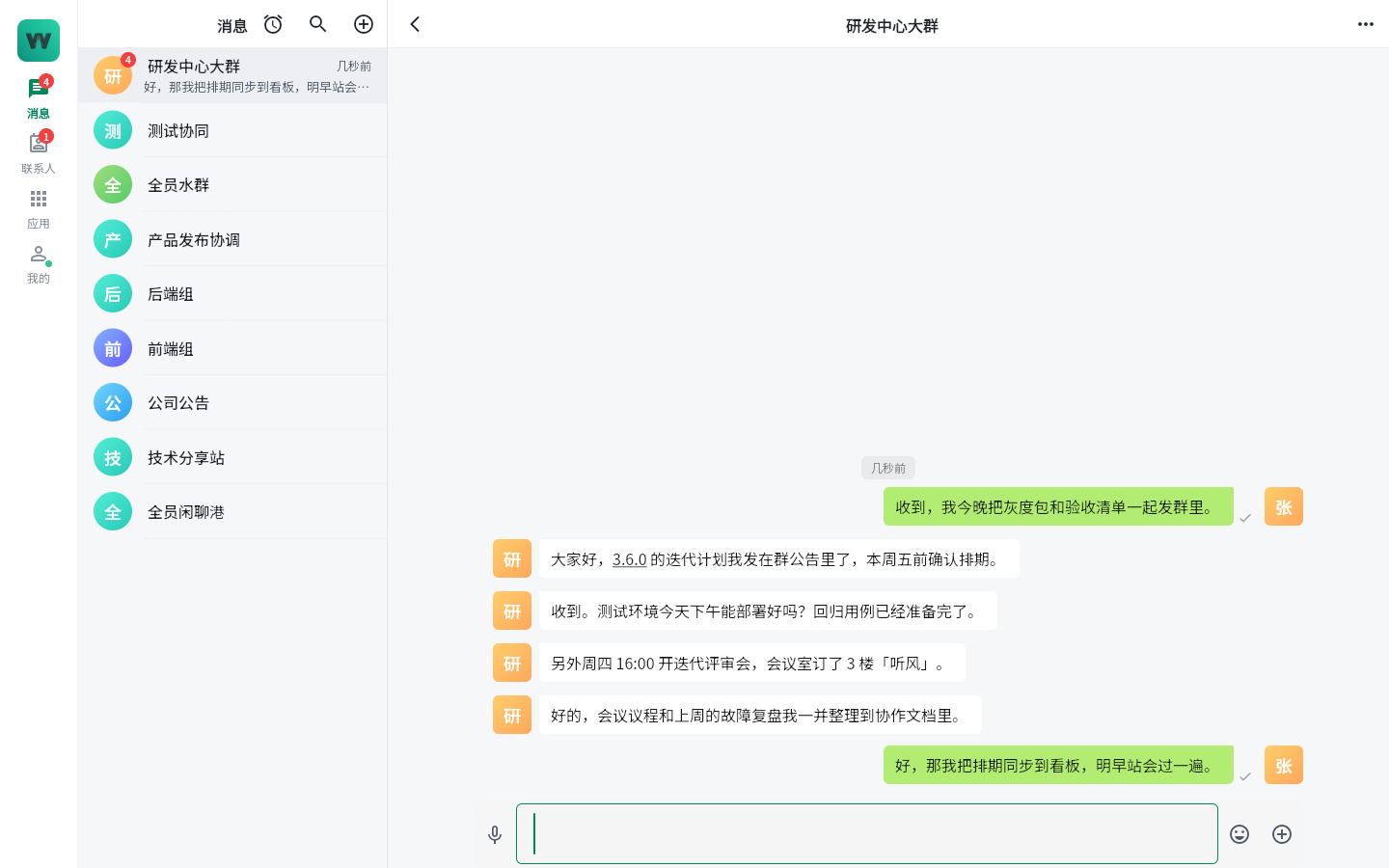
Conversation window: topics, quotes, stickers, and the secret chat entry all live in the chat interface
Typical scenarios
- All-hands notices: broadcast via channels plus 10,000-member groups, so policies and announcements reach everyone in one pass;
- Confidential communication: switch to secret chat for sensitive topics such as compensation or M&A — timed auto-recall, screenshot alerts, and a hidden watermark provide triple protection;
- Finding past conclusions: no need to scroll through chat history; full-text search locates the original file and decision directly.
2. Audio/Video Conferencing
| Feature | What you can do |
|---|---|
| 1-on-1 calls | Start a point-to-point audio/video call with one click from the chat window |
| Multi-party meetings | Create multi-party meetings, with pre-meeting invitations and in-meeting invites |
| Host controls | The host can mute members, remove members, and lock the meeting to keep order |
| Screen sharing | Share your whole screen to present documents or review proposals |
| Cloud recording and playback | Meetings are recorded to the cloud as MP4; absent colleagues can catch up anytime |
| Group live streaming | Go live inside a group; members join the live room, watch, and interact through live comments |
| Speech to text | Voice messages and call audio are automatically transcribed for easy archiving and retrieval |
Typical scenarios
- Regular meetings and reviews: multi-party meetings + screen sharing + cloud recording; absent colleagues just watch the replay to catch up;
- Company-wide town halls: group live streaming with live-comment interaction brings annual meetings and training online;
- Cross-language meetings: conversation-level auto translation combined with speech to text keeps global teams working smoothly.
3. Office Collaboration
| Feature | What you can do |
|---|---|
| OA approvals | Submit six common approval categories such as leave and expense claims; administrators can adjust approval flows themselves with the visual process designer |
| Attendance check-in | Mobile check-in verified by GPS + WiFi dual-location validation, with shift scheduling support |
| Work reports | Fill in and aggregate daily and weekly reports online; managers review team updates in one click |
| Company announcements | Publish announcements that reach everyone — important notices no longer depend on being forwarded |
| OKR | Goals are visualized in an alignment tree showing reporting relationships; score online at the end of each cycle and generate an AI cycle summary |
| HR onboarding | New employees get accounts provisioned automatically on day one — no manual setup per system |
| Base multi-dimensional tables | Build business ledgers as spreadsheets (e.g., supplier lists, event schedules) with multiple views for organizing data |
| Calendar and meeting rooms | Scheduling, meeting invitations, and meeting room booking handled together |
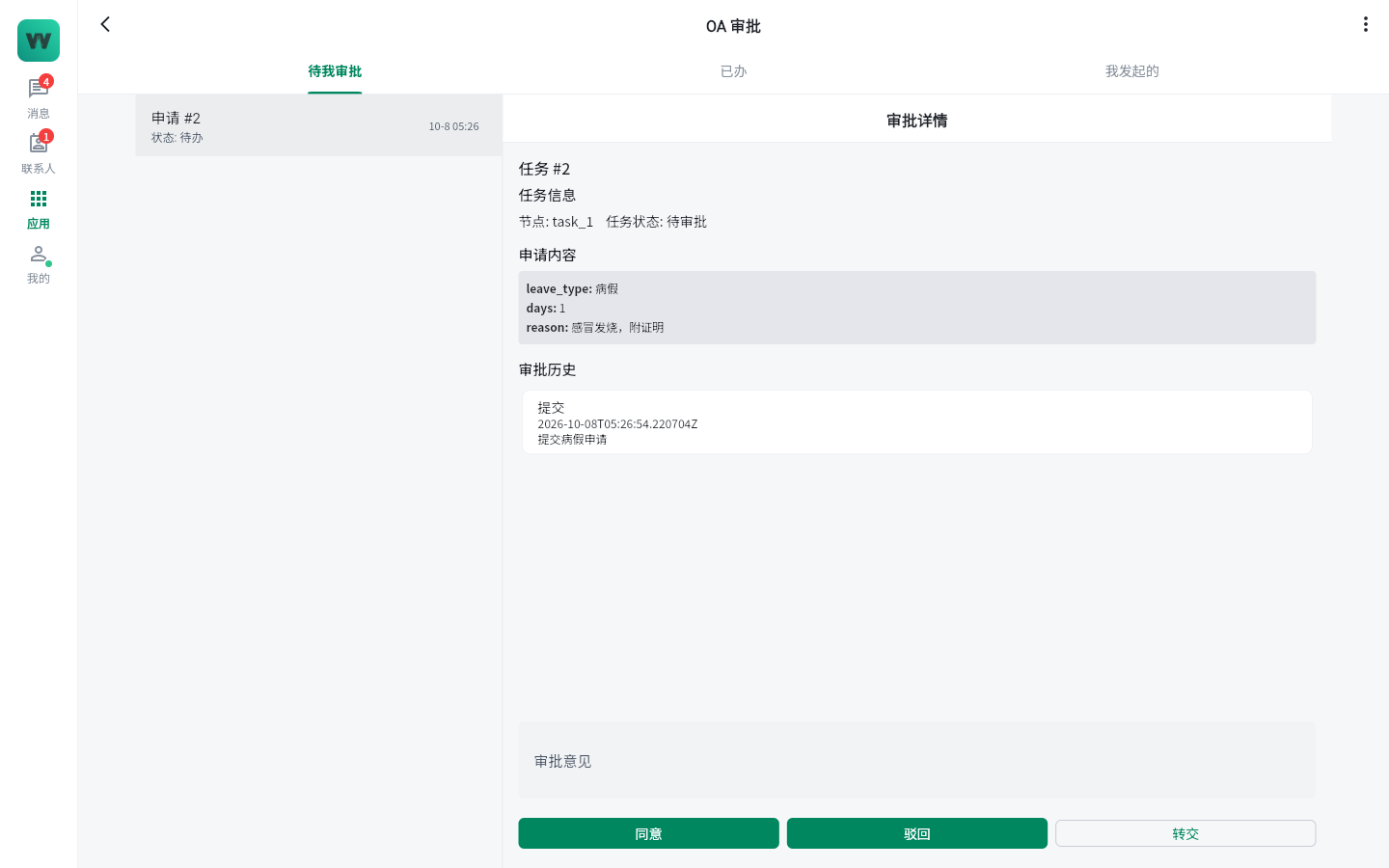
OA approvals: process status and nodes visible end to end
Typical scenarios
- Administrative tasks: leave and expense approvals submitted and signed on mobile; the process designer lets administrators adjust approval flows themselves;
- Goal management: align goals with the OKR alignment tree at the start of a quarter, then review scores and the AI cycle summary at the end;
- Logistics arrangements: book meeting rooms via the calendar; attendance is checked automatically against shift schedules.
4. Documents and Knowledge
| Feature | What you can do |
|---|---|
| Real-time co-editing | Multiple people edit one document at the same time, with changes visible instantly and comment-based collaboration |
| Knowledge spaces | Create knowledge spaces per team and project, so documents are archived and accumulated in order |
| Canvas | Brainstorm on an online whiteboard with frame playback — replay the creation process frame by frame for more intuitive review and retrospective |
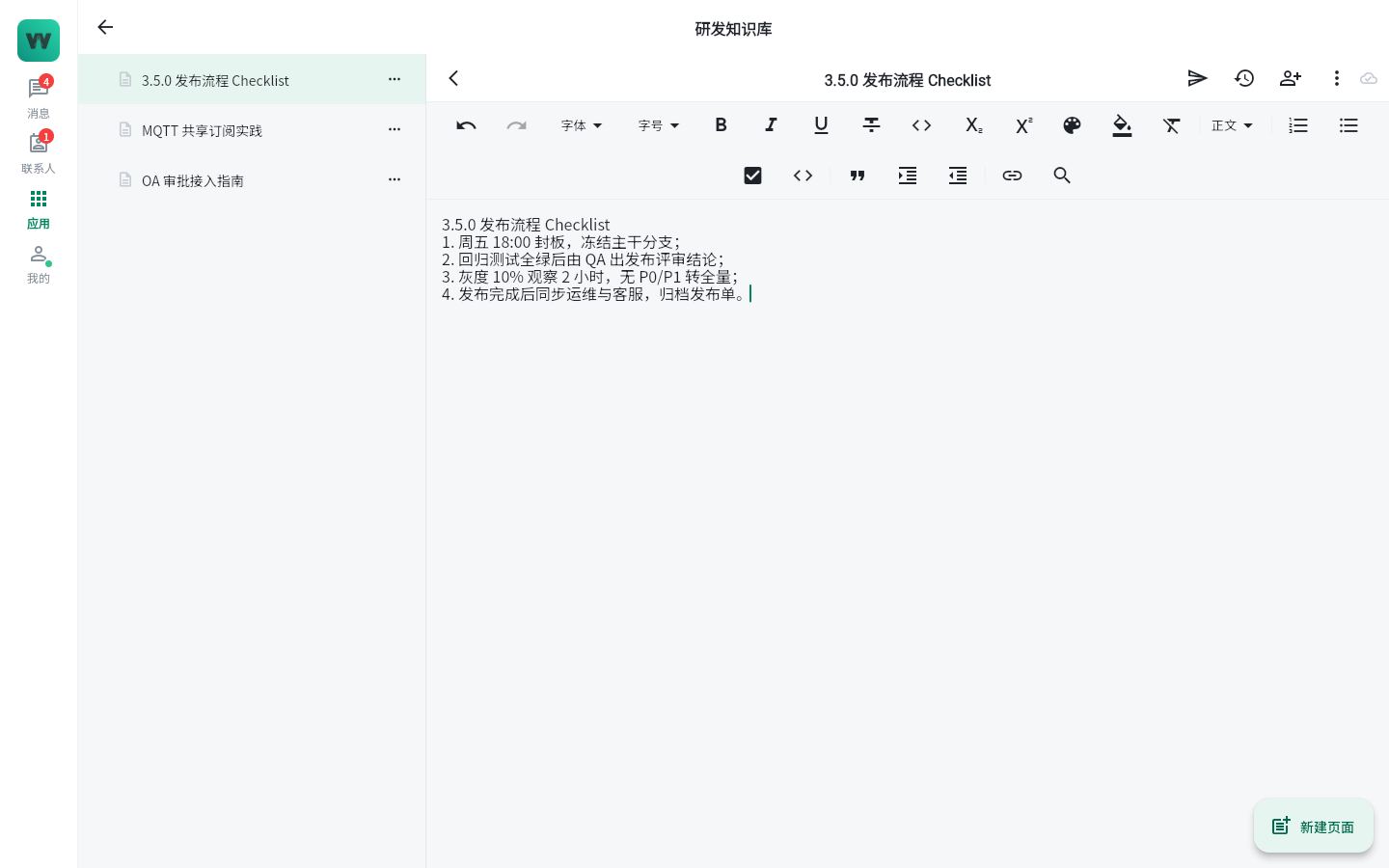
Collaborative documents: multiple people editing the same document in real time
5. Project Management
| Feature | What you can do |
|---|---|
| Kanban swimlanes | Tasks move across the board as cards, organized by swimlane for stage or priority |
| Automation rules | Configure rules such as "notify on status change" or "remind on overdue" to reduce manual work |
| Burndown charts | View iteration burndown charts and track progress and remaining work in real time |
| Trello import | Import existing Trello boards with one click — migration at zero cost |
| Contribution leaderboard | Gamified member contribution rankings motivate the team |
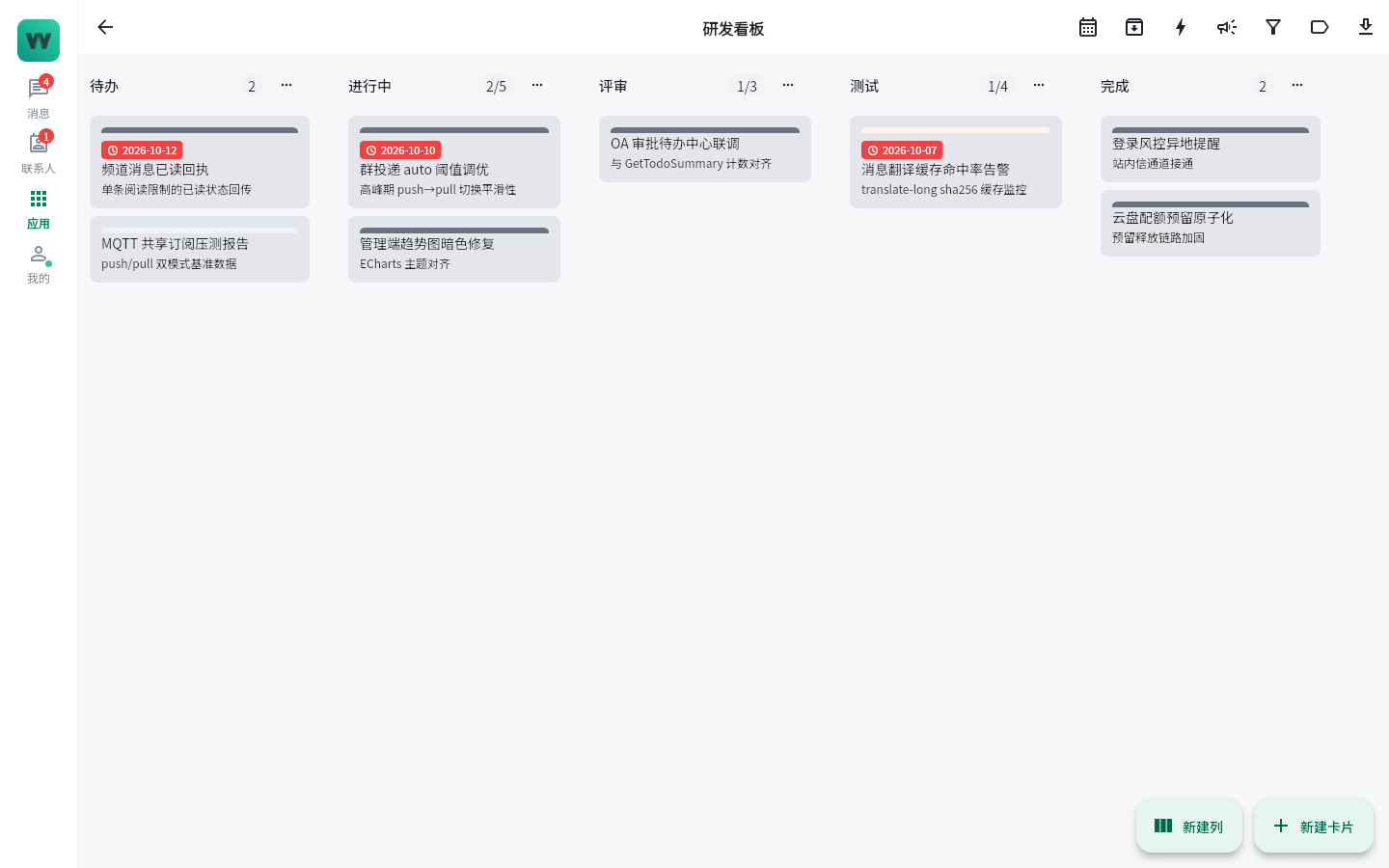
Project kanban: swimlane-based task management
6. Customer Business
| Feature | What you can do |
|---|---|
| Opportunity funnel | Opportunities advance through six stages; the funnel view shows conversion at a glance |
| Customer 360 | The customer detail view aggregates basic info, communication records, follow-up tasks, and orders on one page |
| ERP | Purchasing, inventory, finance, and sales work together, with order-inventory-finance data consistent in real time |
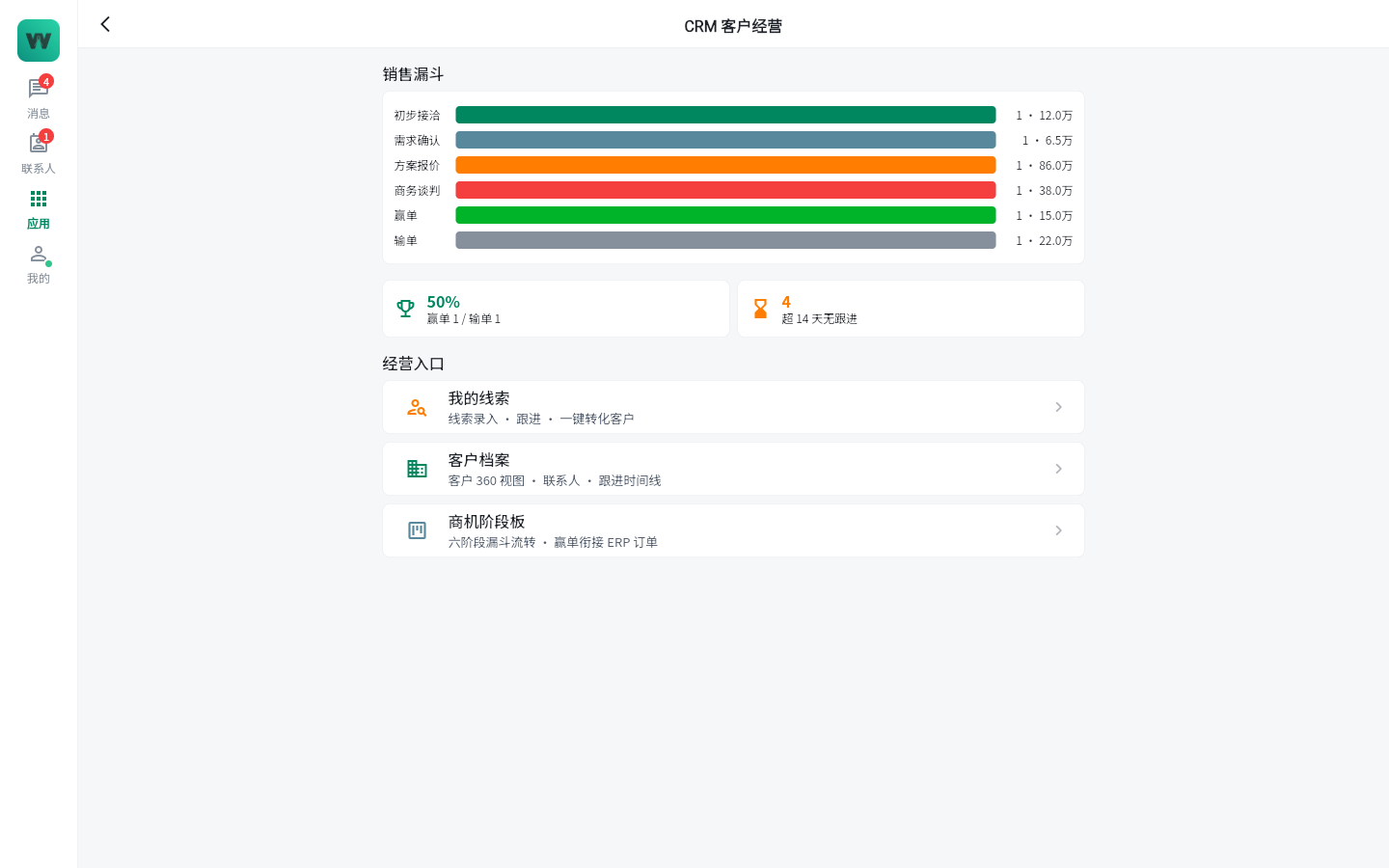
CRM: opportunity funnel and Customer 360 views
7. R&D Collaboration
| Feature | What you can do |
|---|---|
| Code review | Integrate GitLab / Gitea / GitHub / SVN repositories; review requests go straight to group chat |
| CI/CD build cards | Pipeline build results are pushed to group chat as cards, keeping release progress visible to everyone |
| On-call duty | Duty schedules and alert response put a name on every production issue |
| DORA reports | View reports on key engineering-performance metrics, with evidence for continuous improvement |
8. Community and Content
| Feature | What you can do |
|---|---|
| Moments | Post updates, like, and comment — internal life and work sharing |
| Short videos | A vertically scrolling short-video feed for immersive browsing of training decks and marketing content |
| Group live streaming | Start a live stream inside a group with live-comment interaction, ideal for training and town halls |
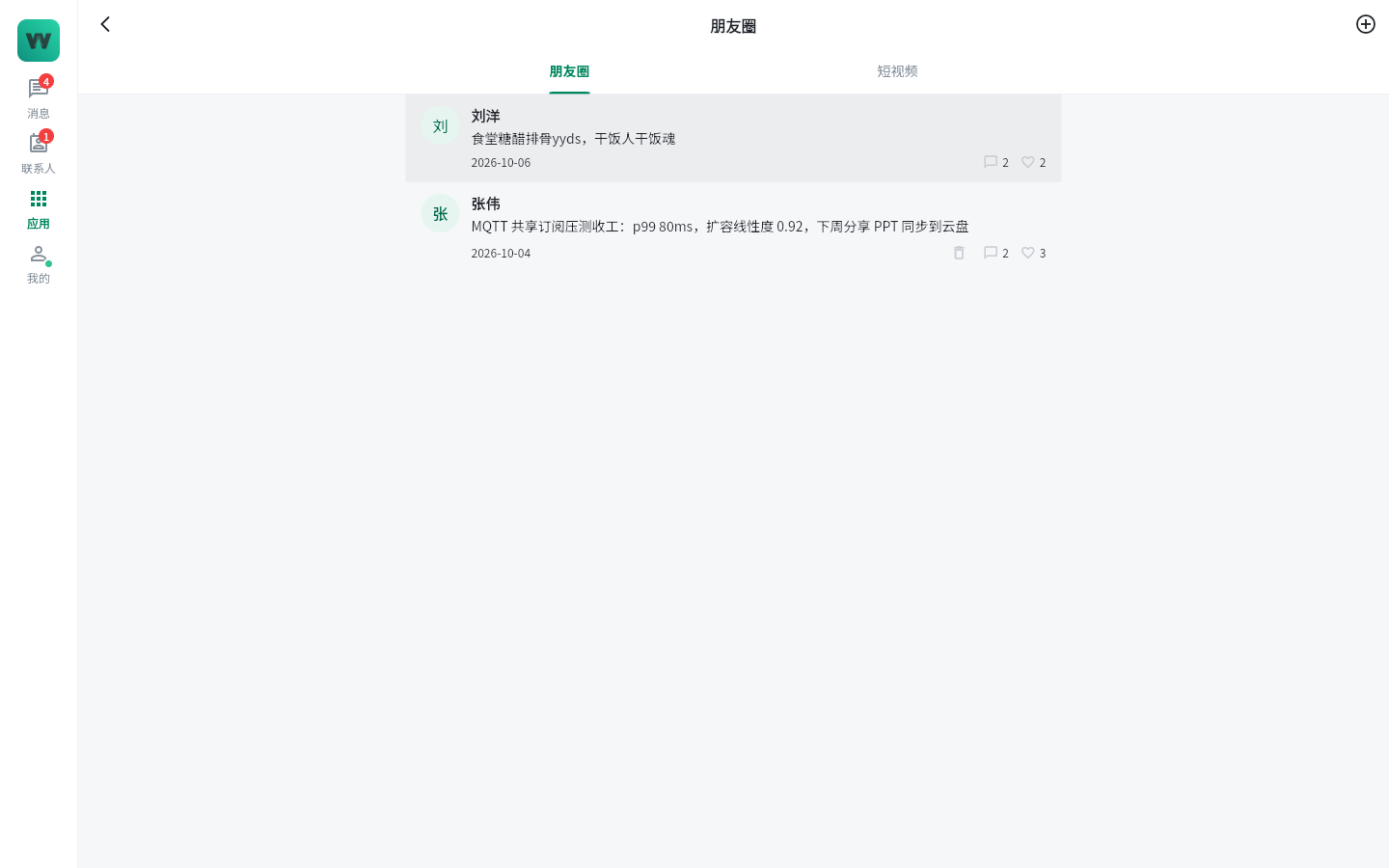
Moments: the internal content community
9. Customer Service
| Feature | What you can do |
|---|---|
| Web visitor sessions | Visitors start a conversation right from your website — no client installation required |
| Ticket management | Visitor inquiries become tickets for follow-up, with the handling process fully traceable |
| Tickets converted to CRM | Visitors with purchase intent can be moved into CRM as opportunities, connecting service and sales |
10. Security and Administration
| Feature | What you can do |
|---|---|
| Conversation watermarks | Watermarks overlaid on the client UI make leaked screenshots traceable to individuals |
| Login risk control | Detect logins from unusual locations with real-time alerts, so account anomalies surface early |
| Device management | View and manage logged-in devices; remotely sign out lost devices |
| Sensitive-word filtering | Configure a sensitive-word library; violating content is blocked automatically |
| Audit logs | Full records of sensitive operations satisfy internal-control and compliance reviews |
| Retention, archiving, and export | Chat records are retained, archived, and exported by policy to meet industry regulatory requirements |
Typical scenarios
- Preventing information leaks: conversation watermarks plus secret-chat hidden watermarks provide double protection; leaked screenshots can be traced to the specific person;
- Compliance reviews: audit logs plus chat record retention and archiving — finance, government, and enterprise customers can export materials directly for inspections.
11. AI Assistant
| Feature | What you can do |
|---|---|
| AI customer service | AI auto-replies to frequently asked questions so human agents focus on complex inquiries |
| AI conversation summaries | Summarize conclusions and to-dos from long chat histories with one click |
| AI tickets | Issues raised in conversation are intelligently converted into tickets with AI-assisted handling |
| Auto translation | Conversation-level real-time translation for seamless cross-language teamwork |
| Enterprise knowledge base Q&A | RAG-based Q&A over your own company documents, with answers backed by sources |
| AI stand-up minutes | Daily stand-up minutes generated automatically, saving time on agile meetings |
| Usage quotas | Administrators set AI token usage quotas per tenant, keeping costs under control |
Typical scenarios
- Knowledge Q&A: connect policies and product materials to the enterprise knowledge base; new employees ask the AI directly and answers come from company documents;
- Meeting efficiency: AI generates stand-up minutes automatically, and one click summarizes long group chats so to-dos are never missed.
FAQ
Q: How is secret chat different from normal chat?
Messages in secret chat auto-recall when the timer expires, the other party's screenshots trigger an alert, and the screen carries a traceable hidden watermark — ideal for sensitive matters.
Q: Do AI features cost extra?
The platform provides tenant-level token usage quotas; administrators can set quotas for different departments, keeping AI usage transparent and controllable.
Q: How do I migrate an existing Trello board?
Project management includes built-in Trello import: migrate existing boards with one click, keeping tasks and statuses fully intact.
Q: How do external customers reach us?
Visitors chat with company agents through the web, with no client installation; inquiries with purchase intent can be converted into CRM for continued follow-up.
Editions and feature availability
Some features (such as R&D collaboration, visitor customer service, and CRM / ERP) depend on the licensed edition — see Product Introduction · Editions and Licensing.